Local-first dev with CAP Node.js - mocking remote services
In this post I provider a taster of what's possible regarding mock remote services in CAP Node.js local-first development.
This post is one of a series on local-first development with CAP Node.js.
Calesi and mocking remote services
In the context of CAP-Level Service Integration (aka "Calesi") we can mash up remote and local services, and in the full spirit of CAP generally, run everything in airplane mode, i.e. fully locally.
Working through an example
In this post, we'll work through an example of mocking a remote service, based on content in the remoteservice/ directory of the repo set up for the related talk.
We start with an almost empty project directory, save for a basic
package.json file which we only really have at this point so we can check the
changes in it that are introduced when we import a remote service API
definition. All operations are done in the context of this project directory.
The other files in this directory in the repo are related to performing and resetting the demo during the talk version of this post.
Examining and importing the candidate remote service
At https://odd.cfapps.eu10.hana.ondemand.com/ there's the northbreeze OData V4 service with Products, Categories and Suppliers1. The service's API is available as the metadata document so let's grab that:
curl \
  --url 'https://odd.cfapps.eu10.hana.ondemand.com/northbreeze/$metadata' \
> northbreeze.edmx
and use cds import to import it to our project:
cds import northbreeze.edmxThis emits:
[cds] - updated ./package.json

[cds] - imported API to srv/external/northbreeze
> use it in your CDS models through the likes of:

using { northbreeze as external } from './external/northbreeze';
and the EDMX API definition, along with the CAP-focused CSN equivalent that was
created at import, are moved into an external/ directory within a standard
srv/ directory (which itself is
autovivified at this point):
./
├── package.json
└── srv/
    └── external/
        ├── northbreeze.csn
        └── northbreeze.edmx
Mocking is automatically and immediately initiated
At this point too, the CAP server restarts and shows:
[cds] - loaded model from 1 file(s):

  srv/external/northbreeze.csn

[cds] - using bindings from: { registry: '~/.cds-services.json' }
[cds] - connect to db > sqlite { url: ':memory:' }
/> successfully deployed to in-memory database.

[cds] - mocking northbreeze {
  at: [ '/odata/v4/northbreeze' ],
  decl: 'srv/external/northbreeze.csn:170'
}
[cds] - server listening on { url: 'http://localhost:4004' }
This is because cds watch is actually shorthand for:
cds serve all --with-mocks --in-memory?and if we read the help for --with-mocks we see this:
Use this in combination with the variants serving multiple services.
It starts in-process mock services for all required services configured in package.json#cds.requires, which don't have external bindings in the current process environment.
Note that by default, this feature is disabled in production and must be enabled with configuration 'features.mocked_bindings=true'.
That's right - mocking is already being done for our imported remote service!
It's in-process, i.e. within the same CAP server process that we started with
cds watch.
The package.json file is extended
As part of the import process, package.json was modified in two key areas:
--- a/remoteservice/package.json
+++ b/remoteservice/package.json
@@ -4,7 +4,10 @@
   "description": "Demonstrating local-first support for remote services",
   "dependencies": {
     "@sap/cds": "^9",
-    "express": "^4"
+    "express": "^4",
+    "@sap-cloud-sdk/connectivity": "^4",
+    "@sap-cloud-sdk/http-client": "^4",
+    "@sap-cloud-sdk/resilience": "^4"
   },
   "devDependencies": {
     "@cap-js/sqlite": "^2"
@@ -12,5 +15,13 @@
   "scripts": {
     "start": "cds-serve"
   },
-  "private": true
-}
+  "private": true,
+  "cds": {
+    "requires": {
+      "northbreeze": {
+        "kind": "odata",
+        "model": "srv/external/northbreeze"
+      }
+    }
+  }
+}
- the SAP Cloud SDK libraries were added - for marshalling of, connection to and communication with remote destinations2
- the remote service is added as "required", with the name
northbreeze
Reviewing the situation
This in-process mocking of the required remote service "northbreeze" means that in the CAP server context that exists for our project, we have that remote service as an endpoint available to us at http://localhost:4004:
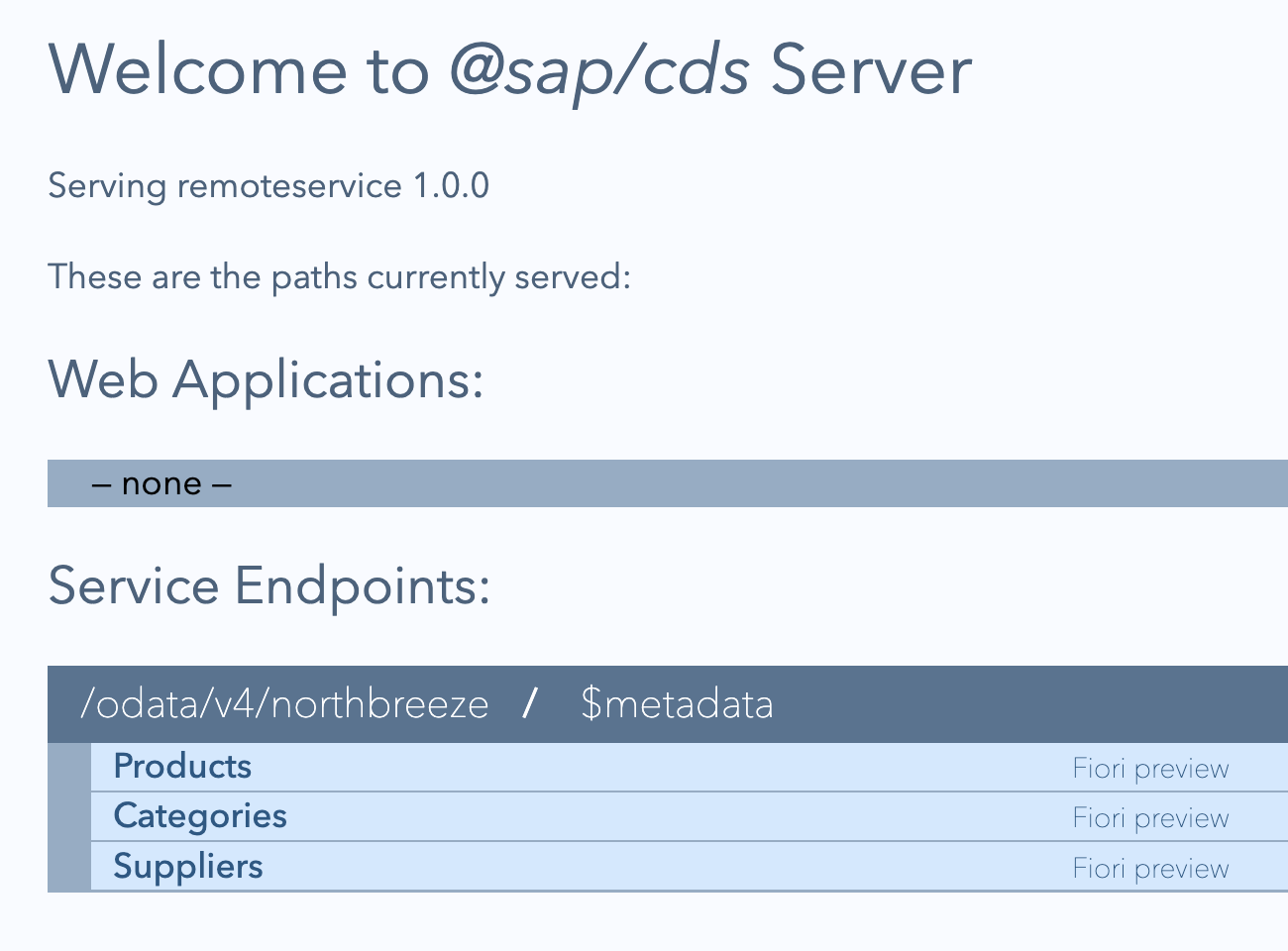
But while the mocked remote service is already fully formed, even in this "in-process" mode, there's no data. Let's add some so we can better explore the service.
Add data for the mocked remote service
Using CAP's mock data facilities, we can easily come up with some mock data. Because of CAP's convention over configuration axiom, this works even for mocked remote services. As an erstwhile Perl programmer, I appreciate this DWIM-style approach.
To dig in more to the mock data facilities in CAP, see the mocking data blog post in this series.
Have some data generated
Let's first have CAP generate some data for us:
cds \
  add data \
  --filter Categories \
  --records 10
This creates a CSV file with an appropriate name and in the expected place for initial data:
./
├── db/
│   └── data/
│       └── northbreeze.Categories.csv
├── package.json
└── srv/
    └── external/
        ├── northbreeze.csn
        └── northbreeze.edmx
Retrieve data and use that too
Given this is about gathering some data to exercise the mocked remote service, it's likely that the actual remote service has data that we can perhaps use too.
Being an OData V4 service, the data available, in the form of, say, an entityset, is going to be in JSON format by default. But that's fine, the CAP server's data mechanism can deal with this too. So let's grab the Products data from the actual remote service and place it alongside the Categories data we have:
curl \
  --silent \
  --url 'https://odd.cfapps.eu10.hana.ondemand.com/northbreeze/Products' \
| jq .value \
> db/data/northbreeze.Products.json
We can mix CSV and JSON data with ease:
./
├── db/
│   └── data/
│       └── northbreeze.Categories.csv
:       └── northbreeze.Products.json
and it's picked up as we would hope:
[cds] - connect to db > sqlite { url: ':memory:' }
  > init from db/data/northbreeze.Products.json
  > init from db/data/northbreeze.Categories.csv
/> successfully deployed to in-memory database.
Move the data closer to the service
While the data for this mocked external required service is perfectly fine in
db/data/ and is picked up as we'd expect, perhaps it makes more sense to keep
it closer to the service definition, as a "bundle", as it were. That will work
too, with respect to the automatic data loading mechanism, so let's do that:
mv db/data/ srv/external/Now the external service is more self-contained:
./
├── db/
├── package.json
└── srv/
    └── external/
        ├── data/
        │   ├── northbreeze.Categories.csv
        │   └── northbreeze.Products.json
        ├── northbreeze.csn
        └── northbreeze.edmx
Switching to a more realistic scenario
There are a couple of aspects we should look at now, based on the very simple setup we have so far:
- the required remote service has been mocked in-process; ideally we want a local development scenario that is closer to the eventual production situation
- it is also entirely independent, unrelated to any local service definitions
Regarding the first aspect, we can also have a service mocked in a separate process, instead of being mocked in-process. One effect of this is that real wire API calls are made between your local service and the separately mocked (but still locally running) remote service.
Regarding the second aspect, we'll set up a local to remote proxy definition in our CDS model, for an entity. We'll do that first staying with in-process mocking, and then switch to separate process based mocking.
Set up a local to remote proxy definition
One of the simplest forms of service mashup is surfacing a remote entity as a local one. This may not be entirely useful, but it demonstrates the atomic structure of more involved scenarios, and is nice and simple so as not to get in the way of understanding here.
First, add the following service definition in srv/main.cds, remembering that
the using directive here brings in the northbreeze scope from the imported
remote service definition that was created with the cds import earlier:
using {northbreeze} from './external/northbreeze';

service Main {
  entity Products as projection on northbreeze.Products;
}
In the following sections, we'll see the difference between in-process and external process mocking.
Examine the CAP server logs now
Once the CAP server restarts, take a look at the log output:
[cds] - loaded model from 2 file(s):

  srv/main.cds
  srv/external/northbreeze.csn

[cds] - using bindings from: { registry: '~/.cds-services.json' }
[cds] - connect to db > sqlite { url: ':memory:' }
  > init from srv/external/data/northbreeze.Products.json
  > init from srv/external/data/northbreeze.Categories.csv
/> successfully deployed to in-memory database.

[cds] - serving Main {
  at: [ '/odata/v4/main' ],
  decl: 'srv/main.cds:3'
}
[cds] - mocking northbreeze {
  at: [ '/odata/v4/northbreeze' ],
  decl: 'srv/external/northbreeze.csn:170'
}
What we see is very useful and helps augment our understanding:
- the overall CDS model is built from the local definition we've just created, plus the definitions from the remote service
- initial data is being loaded from the CSV and JSON files
- the local provided service
Mainis served - the remote required service
northbreezeis also served, mocked in-process
Moreover, when we request a Products resource from the local Main service
at /odata/v4/main, which as we know from our service definition is a
projection onto the corresponding entity in the remote service definition:
curl --url 'localhost:4004/odata/v4/main/Products?$top=1'we get a successful result:
{
  "@odata.context": "$metadata#Products",
  "value": [
    {
      "ProductID": 1,
      "ProductName": "Chai",
      "QuantityPerUnit": "10 boxes x 20 bags",
      "UnitPrice": 18,
      "Category_CategoryID": 1,
      "Supplier_SupplierID": 1,
      "UnitsInStock": 39,
      "UnitsOnOrder": 0,
      "ReorderLevel": 10,
      "Discontinued": false
    }
  ]
}
This is due to the in-process based connectivity available in the single CAP server process.
Let's stop the CAP server at this point.
Mock the remote service in a separate process
In a second terminal window, let's now start the standalone mocking of the
required northbreeze service with the cds mock
command3, like this:
cds mock northbreezeWe should see output like this:
[cds] - using bindings from: { registry: '~/.cds-services.json' }
[cds] - connect to db > sqlite { database: ':memory:' }
  > init from srv/external/data/northbreeze.Products.json
  > init from srv/external/data/northbreeze.Categories.csv
/> successfully deployed to in-memory database.

[cds] - mocking northbreeze {
  at: [ '/odata/v4/northbreeze' ],
  decl: 'srv/external/northbreeze.csn:170'
}
[cds] - server listening on { url: 'http://localhost:42623' }
The initial data is loaded as before, the northbreeze service is served, but
crucially:
- the provided
Mainservice is not served (as we haven't asked it to be) - the required
northbreezeservice is available on a non-standard (in fact random) port 42623
We can successfully request resources in this mocked remote service at
http://localhost:42623/odata/v4/northbreeze.
Start a normal CAP server process to have the local service served
Now in the first terminal window, let's restart the CAP server with cds watch, and we should now see:
[cds] - using bindings from: { registry: '~/.cds-services.json' }
[cds] - connect to db > sqlite { url: ':memory:' }
/> successfully deployed to in-memory database.

[cds] - serving Main {
  at: [ '/odata/v4/main' ],
  decl: 'srv/main.cds:3'
}
[cds] - server listening on { url: 'http://localhost:4004' }
Now, there's no initial data loaded, because that belongs to the required
remote northbreeze service and thus not relevant here, because only the
Main service is being served.
Why is only the provided Main service being served, and not the required
remote northbreeze service, like before?
Get to know the binding registry
To answer that question, we need to recall that highlighted part of the help
for the mocking option to cds serve earlier:
It starts in-process mock services for all required services configured in package.json#cds.requires, which don't have external bindings in the current process environment.
Here, in our local-first development context, our "current process environment" is effectively any (and all) CAP server process(es) running locally.
You might have noticed this line appearing in previous CAP server output samples in this post:
[cds] - using bindings from: { registry: '~/.cds-services.json' }As they start up and shut down, local CAP server processes read and write to
this registry file ~/.cds-services.json. They read it to see what services
are available (that they might be requiring), and write to it to record the
services they're providing (for other locally running CAP server processes).
When we started the separate CAP server to mock the northbreeze remote
service with cds mock northbreeze, information was written to this file,
recording the fact that this northbreeze service is "provided":
{
  "cds": {
    "provides": {
      "northbreeze": {
        "endpoints": {
          "odata": "/odata/v4/northbreeze"
        },
        "server": 17250
      }
    },
    "servers": {
      "17250": {
        "root": "file:///work/gh/github.com/qmacro/cap-nodejs-local-first-development/remoteservice",
        "url": "http://localhost:42623"
      }
    }
  }
}
As we can see, it also records where the provision is, in this case at
http://localhost:42623, which is at the port that the mock server is
listening on.
This is why a random port is not such a problem here.
Retry the local to remote proxy - part 1
Now that we have two CAP server processes running, one mocking the required
remote service northbreeze, and the other serving the local service Main,
let's retry that same request (to get the product data from the mocked remote
service, proxied through the local service definition):
curl --url 'localhost:4004/odata/v4/main/Products?$top=1'Oh dear:
{
  "error": {
    "message": "Entity \"Main.Products\" is annotated with \"@cds.persistence.skip\" and cannot be served generically.",
    "code": "501",
    "@Common.numericSeverity": 4
  }
}
The in-process connectivity available (provided for convenience) cannot be used here, and we have to implement some basic query and connectivity logic which is exactly what we will have to do in a productive scenario anyway.
So let's do that, using the simplest thing that could possibly work - adding
this to a corresponding srv/main.js file:
const cds = require('@sap/cds')
module.exports = cds.service.impl(async function() {
  const northbreeze = await cds.connect.to('northbreeze')
  this.on('READ', 'Products', async (req) => {
    return await northbreeze.run(req.query)
  })
})
When a query arrives to read Products data, send it across to northbreeze
and pass back whatever is returned.
Once the CAP server in the first terminal window restarts because of this change, note that there's a new log line in the output:
[cds] - connect to northbreeze > odata { url: 'http://localhost:42623/odata/v4/northbreeze' }This is a direct result of the await cds.connect.to('northbreeze') line
above.
Retry the local to remote proxy - part 2
With this simple implementation in place, retrying that same request again will result in some very satisfying log output in both CAP server processes.
Before we do, stop the CAP server in the first terminal window and restart it
specifying DEBUG=remote like this, to get more log output detail for remote
related activities:
DEBUG=remote cds watchNow, after retrying the request for a final time, we see this log output in the
first (Main) CAP server log output:
[remote] - GET http://localhost:42623/odata/v4/northbreeze/Products?$select=ProductID,ProductName,QuantityPerUnit,UnitPrice,Category_CategoryID,Supplier_SupplierID,UnitsInStock,UnitsOnOrder,ReorderLevel,Discontinued&$top=1 {
  headers: {
    accept: 'application/json,text/plain',
    'x-correlation-id': 'ff4da315-ec6e-4e89-97d4-85f96b270ed6',
    'x-correlationid': 'ff4da315-ec6e-4e89-97d4-85f96b270ed6'
  }
}
[remote] - Executing via native fetch.
We can see that there's an HTTP request, specifically an OData QUERY operation, that's been constructed and sent to the URL where the remote service is being provided4.
And in the CAP server process in the second terminal window, where we're
separately mocking the northbreeze remote service on 42623, we see that OData
QUERY operation arrive:
[odata] - GET /odata/v4/northbreeze/Products {
  '$select': 'ProductID,ProductName,QuantityPerUnit,UnitPrice,Category_CategoryID,Supplier_SupplierID,UnitsInStock,UnitsOnOrder,ReorderLevel,Discontinued',
  '$top': '1'
}
A true inter-process remote service call. All running locally, and orchestrated in the simplest way possible.
Wrapping up
This post has just scratched the surface of what's possible when it comes to working in local-first development mode, with remote services. For more information and stuff that you can practise yourself, we have the CAP Service Integration CodeJam exercises publicly available for you. Happy learning!
Footnotes
-
"odd" is short for OData Deep Dive, and the service is used in the corresponding SAP Tutorial Navigator mission that I'm rewriting currently - see OData Deep Dive rewrite in the open for details.
-
Note that since the CAP Apr 2026 release, the SAP Cloud SDK is no longer mandatory for remote communication in development scenarios.
-
cds mock servicenameis actually just shorthand forcds serve --mocked servicename --in-memory? --port 0 -
We can also see, via the "Executing via native fetch" line, that the Node-native Fetch API is in use here now, since Apr 2026.