Timeless principles, agnostic design and the power of CAP's abstractions
The timeless principle of agnostic design, aka minimal assumptions, is strongly present in CAP. In this post I explain what this principle represents, based on the corresponding section of Daniel Hutzel's keynote at reCAP 2026.
I wrote recently about Hexagonal Architecture, alternatively known as Ports & Adapters, in Book Overflow and two architectural patterns in CAP. The core idea is based on having a deliberately agnostic approach to mechanisms, resources and services beyond - located in the outer concentric circles, as it were - a given core service.
Think of this in a similar way to "late cut" integration, where the actual location, shape of, and connection to a required service is left until the last minute.
The agnostic design approach is not new, and indeed as Daniel mentions in his keynote, has in the past been referred to as "minimal assumptions", which crops up in various disciplines, including statistics & data analysis, where it conveys the approach of "deriving valid conclusions using the fewest possible restrictive parameters"1.
This approach brings many advantages, not least the ability for CAP developers to enjoy a tight and rapid development loop, where local-first is the mantra, and mocking plus remote proxies are key enablers.
Moreover it allows us to shift left the important business of design, including auth, consumption nuances and extended domain design, exactly because we can shift right the dirty work of connectivity and gnarly setups.
But that's only one half of the story. The other half is that, right from the get-go, we're ready to adapt and adopt new services, or different endpoint locations, because we haven't tightly coupled our app or service design with a specific technology or protocol.
The wonder of cds.service.bindings
To illustrate this, I want to convey the wonder of one of Daniel's live demos
in the keynote. Indeed, this blog post was triggered by something very
specific, when Daniel accessed cds.service.bindings in the cds REPL.
I have talked about the local service binding registry (~/.cds-services.json)
and explained its purpose, in many places, including:
- CAP local development (workshop)
- Service integration with SAP Cloud Application Programming Model (CodeJam)
- A hands-on tour of CAP (CodeJam)
Let's break down what we mean by "local service binding registry":
- local: it's local to my machine, both highlighted and constrained by the location of this file, the developer user's home directory2 - you can't get much more "my machine" specific than that!
- service: required services, that are likely going to be remote in a production scenario
- binding: information that is needed to be able to connect and authenticate with such services, such as URL & credentials, often collected into a destination in production scenarios
- registry: a sort of table of contents, or list of what's currently available
Such a local registry is at the heart of how agnostic design's innermost set of concentric circles (the local machine) can function in CAP.
Seeing Daniel retrieve this binding information directly in the cds REPL was a magic moment for me. It both elevated the combined concepts I've mentioned above, plus made the registry content tangible and thus worthy of attention.
Exploring the first two circles
Let's explore the two innermost circles3, the ones within the local machine.
 +--------------------------+
 |     external process     |
 | ************************ |
 | * +------------------+ * |
 | * | separate process | * |
 | * |  +------------+  | * |
 | * |  | in-process |  | * |
 | * |  |            |  | * |
 | * |  +------------+  | *<---- local machine
 | * +------------------+ * |
 | ************************ |
 +--------------------------+
We can run a single CAP server, that will serve one or more services, via one or more protocols. That's denoted by the core "in-process" circle in this diagram here. When we have a required service without service bindings available, these are mocked also by the same CAP server.
At this point I often refer to the help text for the
--with-mocksoption forcds servewhich goes like this (emphasis mine):Use this in combination with the variants serving multiple services. It starts in-process mock services for all required services configured in
package.json#cds.requires, which don't have external bindings in the current process environment. Note that by default, this feature is disabled in production and must be enabled with configurationfeatures.mocked_bindings=true.
We can run multiple CAP servers on the same machine, choosing different ports4. From the perspective of the "in-process" innermost circle, the next circle out, marked "separate process", represents these other CAP servers.
This "local machine" universe, combined with CAP's local-first affordances, is exactly what we need to experiment with agnostic design here.
This demo follows roughly the same path as Daniel took in his keynote, with some slight variations.
Start monitoring the local service binding registry
It's helpful to see what happens as things progress, so let's use one terminal window to keep an eye on the local service binding registry's contents. Here's how I would do it:
touch ~/.cds-services.json \
  && watch -c jq -C . ~/.cds-services.json
I use
touchfirst to make sure the file exists before trying to monitor it; this command will create the file, empty, if it doesn't. If it has already been populated with information from previously running CAP servers (that have since been stopped) then it may already contain some empty registry structure that looks like this:{ "cds": { "provides": {}, "servers": {} } }
Create a simple CAP project A
First, let's create a simple tiny-sample facet based CAP project "A" then
immediately launch a cds REPL and have the CAP server start
up5:
cds init --add tiny-sample proj-A \
  && cds repl --run proj-A
Log output like this will be emitted:
Adding facet: tiny-sample

Successfully initialized CAP project
Continue with: code proj-A

Welcome to cds repl v10.0.3
[cds] - using bindings from: { registry: '~/.cds-services.json' }
[cds] - loaded model from 1 file(s):

  proj-A/srv/cat-service.cds

[cds] - connect to db > sqlite { database: ':memory:' }
  > init from proj-A/db/data/CatalogService.Books.csv
/> successfully deployed to in-memory database.

[cds] - using auth strategy { kind: 'mocked' }
[cds] - serving CatalogService {
  at: [ '/odata/v4/catalog' ],
  decl: 'proj-A/srv/cat-service.cds:1'
}
[cds] - server listening on { url: 'http://localhost:33475' }
[cds] - server v10.0.3 launched in 209 ms
[cds] - [ terminate with ^C ]

------------------------------------------------------------------------
Following variables are made available in your repl's global context:

from cds.entities: {
}

from cds.services: {
  db,
  CatalogService,
}

Simply type e.g. CatalogService in the prompt to use the respective objects.
So far, so (very) good. Notice that the CAP server is started on a random port, which is the default behaviour when running in a REPL context (as it's effectively more of a "throwaway" server that might be spun up to run some tests against).
Notice also that there's a service called CatalogService that's available.
Check the local service binding registry
In the registry, we now see something like this:
{
  "cds": {
    "provides": {
      "CatalogService": {
        "endpoints": {
          "odata": "/odata/v4/catalog"
        },
        "server": 58557
      }
    },
    "servers": {
      "58557": {
        "root": "file:///tmp/proj-A",
        "url": "http://localhost:33475"
      }
    }
  }
}
This tells us (and any CAP server running in the same binding context, i.e.
this local machine) that there's a service called CatalogService that is
provided. There's information on what the endpoints are, and what protocols
these endpoints speak, and also the URL. In other words, this is the binding
context for the CatalogService that is listed as being provided (note the
cds.provides property that contains it)!
Connect and consume CatalogService locally
Within the REPL, if we now have a quick look at the CatalogService, we see
that it's an instance of the ApplicationService class, effectively a locally
available service:
> CatalogService
ApplicationService {
  handlers: [EventHandlers],
  name: 'CatalogService',
  options: [Object],
  kind: 'app-service',
  ...
  path: '/odata/v4/catalog',
  '$linkProviders': [Array]
}
We can consume that service directly, whereupon we'll get the result we probably expect:
> await CatalogService.read(`Books`)
[
  { ID: 1, title: 'Wuthering Heights', author: 'Emily Brontë' },
  { ID: 2, title: 'Jane Eyre', author: 'Charlotte Brontë' },
  { ID: 3, title: 'The Raven', author: 'Edgar Allen Poe' },
  { ID: 4, title: 'Eleonora', author: 'Edgar Allen Poe' },
  { ID: 5, title: 'Catweazle', author: 'Richard Carpenter' }
]
We can be explicit and connect to the service, a "required" service, like this, too:
> catsrv = await cds.connect.to('CatalogService')
ApplicationService {
  handlers: [EventHandlers],
  name: 'CatalogService',
  options: [Object],
  kind: 'app-service',
  ...
  path: '/odata/v4/catalog',
  '$linkProviders': [Array]
}
We effectively get the same ApplicationService instance, and can use it in
the same way:
> await catsrv.read(`Books`)
[
  { ID: 1, title: 'Wuthering Heights', author: 'Emily Brontë' },
  { ID: 2, title: 'Jane Eyre', author: 'Charlotte Brontë' },
  { ID: 3, title: 'The Raven', author: 'Edgar Allen Poe' },
  { ID: 4, title: 'Eleonora', author: 'Edgar Allen Poe' },
  { ID: 5, title: 'Catweazle', author: 'Richard Carpenter' }
]
Consume the provided service from elsewhere
We don't even need to set up a second project to require (consume) this provided service, we can just start a second cds REPL session and do everything there.
While keeping the current cds REPL session open, let's start a second cds REPL
session in a new terminal window. This should represent a distinctly separate
CAP consumer context and so let's start this second cds REPL session
completely separate from the proj-A/ area to emphasise that point. Daniel used
his home directory for that, so let's do that too:
cd ~ && cds replFetch the service bindings
In the session that we get, which is announced like this:
Welcome to cds repl v10.0.3
>
we can access the service bindings, like this:
await cds.service.bindingsThis fetches the service bindings from the registry and makes them available in the current process:
[cds] - using bindings from: { registry: '~/.cds-services.json' }
Bindings {
  provides: {
    CatalogService: { endpoints: { odata: '/odata/v4/catalog' }, server: 58557 }
  },
  servers: {
    '58557': { root: 'file:///tmp/proj-A', url: 'http://localhost:33475' }
  }
}
We even see that log line familiar to us from our cds watch sessions, being
explicit about from where the bindings are being fetched:
[cds] - using bindings from: { registry: '~/.cds-services.json' }Connect to the service
Like we did in the other cds REPL session, let's now use cds.connect.to:
> cs = await cds.connect.to('CatalogService')
RemoteService {
  handlers: [EventHandlers],
  name: 'CatalogService',
  options: [Object],
  kind: 'odata',
  ...
  requestTimeout: 60000,
  csrf: undefined,
  csrfInBatch: undefined
}
This time, it's not an instance of the ApplicationService class, it's an
instance of the RemoteService class!
Send a query to the service
What's more, we can interact with that service ... as if it were local:
> await cs.read(`Books`)
[
  { ID: 1, title: 'Wuthering Heights', author: 'Emily Brontë' },
  { ID: 2, title: 'Jane Eyre', author: 'Charlotte Brontë' },
  { ID: 3, title: 'The Raven', author: 'Edgar Allen Poe' },
  { ID: 4, title: 'Eleonora', author: 'Edgar Allen Poe' },
  { ID: 5, title: 'Catweazle', author: 'Richard Carpenter' }
]
Wham!
Wrapping up
Going back to the concentric circles, this is a effectively an example of the two that are within the confines of the local machine. One, the provided service, exists as if it were remote (with a URL) in the eyes of the consuming service (or REPL context here).
CAP's adoption of minimal assumptions in service provision and consumption is so complete that the lines become blurred between local and remote, thanks to the power of remote proxies that do the heavy lifting of query transport across the wire for us.
This really is hard evidence of one of CAP's "magic made simple" moments, and is explained further in the CAP-level Integration section of the Bookshop topic in Capire.
Footnotes
-
The symbol for a user's home directory is the tilde (
~). I'm guessing some of you know why it's this symbol, but for those of you who don't, have a look at the keyboard of the ADM-3A terminal, specifically in the top right. Bill Joy, erstwhile employee of Sun and perhaps more importantly creator of bothviand the C Shell (csh), used an ADM-3A and it was in the C Shell where the tilde came to represent a user's home directory.Also on that same key is the caret (
^), which also represents "home" (beginning of a line) in regular expression dialects. Coincidence? I think not! :-)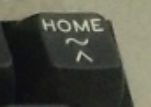
-
OK, it may not have escaped your notice that these are not circles. Just pretend they are.
-
It's the concept of a socket that we must bear in mind, which is the combination of protocol, address (hostname / IP) and port. But that's a story for another time.
-
We can actually just specify the project location as a single argument and the same thing will happen:
cds repl proj-A.
- ← Previous
reCAP 2026 talk resources - Next →
Knowledge and netiquette in today's AI era