CDS expressions in CAP - notes on Part 6
Notes to accompany Part 6 of the mini-series on the core expression language in CDS.
See the series post for an overview of all the episodes.
Introduction
00:00 Introduction and recap.
05:47 Patrice takes over and looks at the syntax diagram in the CXL topic of Capire and the specific path expression diagram. He remarks that one of the cool things about path expressions is that you can chain navigations together, as is shown in one of the examples that follow the diagram:
assoc[filter].struct.assoc.elementSuch navigation paths are materialised at some point (on use) into constructs such as:
- an
EXISTSsubquery - a
LEFT JOIN - a correlated subquery (for the expands)
These path expressions in particular (as well as CXL in general) can be used everywhere; Patrice gives examples:
- in CDL models (when defining the schema or service projections)
- in annotation expressions (when referring to a path or element)
- in queries (written in CQL)
10:26 As good things come
in threes, or so they say, here's a final three-bullet point list (making a
total of three lists, too), where Patrice enumerates the different contexts in
which we used the nonSeller association-like calculated element (nonSeller = books[ stock > 170 ]), in the previous episode:
- with the
EXISTSpredicate - in path expressions in the column list
- in a nested expand construct
12:29 We get a glimpse
behind the scenes at the @cap-js/db-service mechanisms, where Patrice shows
the function that is used to generate aliases, in the context of the new (to us
in this series) style of aliases shown in the normalised, intermediate
CAP-style SQL:
> cds.ql`
  SELECT from ${Authors}
  {name}
  where exists nonSeller
  `.forSQL()
cds.ql {
  SELECT: {
    from: { ref: [ 'sap.capire.bookshop.Authors' ], as: '$A' },
    columns: [ { ref: [ '$A', 'name' ] } ],
    where: [
      'exists',
      {
        SELECT: {
          from: { ref: [ 'sap.capire.bookshop.Books' ], as: '$n' },
          columns: [ { val: 1 } ],
          where: [
            {
              xpr: [
                { ref: [ '$n', 'author_ID' ] },
                '=',
                { ref: [ '$A', 'ID' ] }
              ]
            },
            'and',
            { xpr: [ { ref: [ '$n', 'stock' ] }, '>', { val: 170 } ] }
          ]
        }
      }
    ]
  }
}
These $-prefixed short alias names are "technical" aliases. There's a
function that Patrice dives into, specifically getImplicitAlias in
@cap-js/db-service/lib/utils.js, that has a useTechnicalAlias parameter
which defaults to true.
At this point we'll make the transition to having these technical aliases shown in our CAP-style SQL, as shown in this example, instead of the human-centric ones we've had so far.
Looking at the genres entity definition
16:02 Patrice takes some
time to explain the reason for the technical aliases, using the recursively
structured Genres entity definition as an example:
entity Genres : sap.common.CodeList {
  key ID       : Integer;
      parent   : Association to Genres;
      children : Composition of many Genres
                   on children.parent = $self;
}
Querying the genre information in Patrice's sample project we see the general idea:
> await cds.ql`
  SELECT from ${Genres}
  { name, parent { * } }
  `
[
  { name: 'Fiction', parent: null },
  { name: 'Drama', parent: { name: 'Fiction', descr: null, ID: 10, parent_ID: null } },
  { name: 'Poetry', parent: { name: 'Fiction', descr: null, ID: 10, parent_ID: null } },
  { name: 'Fantasy', parent: { name: 'Fiction', descr: null, ID: 10, parent_ID: null } },
  { name: 'Science Fiction', parent: { name: 'Fiction', descr: null, ID: 10, parent_ID: null } },
  { name: 'Romance', parent: { name: 'Fiction', descr: null, ID: 10, parent_ID: null } },
  { name: 'Mystery', parent: { name: 'Fiction', descr: null, ID: 10, parent_ID: null } },
  { name: 'Thriller', parent: { name: 'Fiction', descr: null, ID: 10, parent_ID: null } },
  { name: 'Dystopia', parent: { name: 'Fiction', descr: null, ID: 10, parent_ID: null } },
  { name: 'Fairy Tale', parent: { name: 'Fiction', descr: null, ID: 10, parent_ID: null } },
  { name: 'Non-Fiction', parent: null },
  { name: 'Biography', parent: { name: 'Non-Fiction', descr: null, ID: 20, parent_ID: null } },
  { name: 'Autobiography', parent: { name: 'Biography', descr: null, ID: 21, parent_ID: 20 } },
  { name: 'Essay', parent: { name: 'Non-Fiction', descr: null, ID: 20, parent_ID: null } },
  { name: 'Speech', parent: { name: 'Non-Fiction', descr: null, ID: 20, parent_ID: null } }
]
To help visualise the genre hierarchy, here it is represented in a tree structure:
/tmp/genres/
├── Fiction (10)
│   ├── Drama
│   ├── Dystopia
│   ├── Fairy Tale
│   ├── Fantasy
│   ├── Mystery
│   ├── Poetry
│   ├── Romance
│   ├── Science Fiction
│   └── Thriller
└── Non-Fiction (20)
    ├── Biography (21)
    │   └── Autobiography
    ├── Essay
    └── Speech
Because we'll be referring to them later in this post, the IDs for
Fiction,Non-FictionandBiography(genres that are "parents") are shown in brackets.
An introduction to scoped queries
16:44 At this point
Patrice introduces us to "scoped queries", where we can traverse the FROM
with a path expression like construct:
> await cds.ql`
  SELECT from ${Genres}:parent
  { name }
  `
[
  { name: 'Fiction' },
  { name: 'Non-Fiction' },
  { name: 'Biography' }
]
Here's another "wait, what's this and what's going on?!" moment in this series :-)
Let's have a look at the CQN:
> q = cds.ql`
  SELECT from ${Genres}:parent
  { name }
  `
cds.ql {
  SELECT: {
    from: { ref: [ 'sap.capire.bookshop.Genres', 'parent' ] },
    columns: [ { ref: [ 'name' ] } ]
  }
}
The value for from looks very much like a path expression - a ref with a
value that is an array of multiple elements [ 'sap.capire.bookshop.Books', 'parent' ].
Next, let's have a look at the CAP-style SQL:
> q.forSQL()
cds.ql {
  SELECT: {
    from: { ref: [ 'sap.capire.bookshop.Genres' ], as: '$p' },
    columns: [ { ref: [ '$p', 'name' ] } ],
    where: [
      'exists',
      {
        SELECT: {
          from: { ref: [ 'sap.capire.bookshop.Genres' ], as: '$G' },
          columns: [ { val: 1 } ],
          where: [
            { ref: [ '$G', 'parent_ID' ] },
            '=',
            { ref: [ '$p', 'ID' ] }
          ]
        }
      }
    ]
  }
}
Taking a moment to stare at this the mist starts to clear. Looking at this intermediate form, we see:
- there's an
EXISTSclause that's been materialised - the "lead" and "related" entities involved are the same, here (
Genres) - the main query retrieves the genre name
- the subquery returns something based on a condition that correlates a relationship within this single entity
- that condition is that the ID of the genre whose name we're retrieving in the main query ... matches a parent ID value, at least once
In other words, "retrieve the genres that are parents" (i.e. that have children).
This can be stretched out to another path level, to retrieve genres that are "grandparents" (i.e. that are parents of parents):
> q = cds.ql`
  SELECT from ${Genres}:parent.parent
  { name }
  `
cds.ql {
  SELECT: {
    from: { ref: [ 'sap.capire.bookshop.Genres', 'parent', 'parent' ] },
    columns: [ { ref: [ 'name' ] } ]
  }
}
This returns just a single result in the set:
> await q
[
  { name: 'Non-Fiction' }
]
This makes sense, as we can see in the tree structure earlier, Non-Fiction is
the only genre that is a parent of a parent:
/tmp/genres/
...
└── Non-Fiction (20)
    ├── Biography (21)
    │   └── Autobiography
    ├── Essay
    └── Speech
Further examples of scoped queries
I initially struggled with this example. Illustrative as it was (especially
with the parent.parent part), it was one that was a little complicated due to
its self-referential nature.
So I used the power & utility of the cds REPL to explore more, and things started to make sense. For example, this query gives us the genres for books written by authors 40 years old or younger (Carpenter and the two Brontë sisters):
> q = cds.ql`
  SELECT from Authors[age <= 40]:books.genre
  { name }
  `
cds.ql {
  SELECT: {
    from: {
      ref: [
        {
          id: 'Authors',
          where: [ { ref: [ 'age' ] }, '<=', { val: 40 } ]
        },
        'books',
        'genre'
      ]
    },
    columns: [ { ref: [ 'name' ] } ]
  }
}
> await q
[
  { name: 'Drama' },
  { name: 'Romance' },
  { name: 'Mystery' }
]
Again we have a path expression traversal happening in the from part of the
query, this time with an infix filter on the first part of the path. I used an
infix filter here to make the example a little more interesting.
I then wondered to myself what it would look and feel like to use an infix filter on a different part of the path, and came up with this:
> q = cds.ql`
  SELECT from ${Authors}:books[title like 'The %'].genre
  { name }
  `
cds.ql {
  SELECT: {
    from: {
      ref: [
        'sap.capire.bookshop.Authors',
        {
          id: 'books',
          where: [ { ref: [ 'title' ] }, 'like', { val: 'The %' } ]
        },
        'genre'
      ]
    },
    columns: [ { ref: [ 'name' ] } ]
  }
}
This produces the names of the genres of books that begin with the definite article ("The ..."):
> q = cds.ql`
  SELECT from ${Authors}:books[title like 'The %'].genre
  { name }
  `
cds.ql {
  SELECT: {
    from: {
      ref: [
        'sap.capire.bookshop.Authors',
        {
          id: 'books',
          where: [ { ref: [ 'title' ] }, 'like', { val: 'The %' } ]
        },
        'genre'
      ]
    },
    columns: [ { ref: [ 'name' ] } ]
  }
}
> await q
[
  { name: 'Fantasy' },
  { name: 'Mystery' }
]
At first I thought the first part of the path in this query would now be redundant, assuming that I could have just written:
> q = cds.ql`
  SELECT from ${Books}[title like 'The %'].genre
  { name }
  `
But I was mistaken.
The key to thinking about this is remembering the term "scoped". To illustrate, let's adjust the postfix projection to have the book titles returned, and run the scoped query:
> await cds.ql`
  SELECT from ${Authors}:books[title like 'The %']
  { title }
  `
[
  { title: 'The Raven' },
  ... (12 rows removed for brevity)
  { title: 'The Fall of Gondolin' }
]
Running the unscoped query returns the same result set, yes:
> await cds.ql`
  SELECT from ${Books}[title like 'The %']
  { title }
  `
[
  { title: 'The Raven' },
  ... (12 rows removed for brevity)
  { title: 'The Fall of Gondolin' }
]
At this point let's add a book, but without a connection to an author, like this:
> await INSERT.into(Books,[{ID:999,title: 'The Book With No Author!'}])
InsertResult { results: [ { changes: 1, lastInsertRowid: 999 } ] }
Now re-running those queries gives us different result sets. First, the new book is included in the result set for the unscoped query:
> await cds.ql`
  SELECT from ${Books}[title like 'The %']
  { title }
  `
[
  { title: 'The Raven' },
  ... (12 rows removed for brevity)
  { title: 'The Fall of Gondolin' },
  { title: 'The Book With No Author!' }
]
But it is not included in the result set for the scoped query:
> await cds.ql`
  SELECT from ${Authors}:books[title like 'The %']
  { title }
  `
[
  { title: 'The Raven' },
  ... (12 rows removed for brevity)
  { title: 'The Fall of Gondolin' }
]
While both queries are materialised into SELECTs on
sap.capire.bookshop.Books, the scoped query constrains the result set to
those entries where there is an author, as we can see with the EXISTS in the
intermediate SQL:
> cds.ql`
  SELECT from ${Authors}:books[title like 'The %']
  { title }
  `.forSQL()
cds.ql {
  SELECT: {
    from: { ref: [ 'sap.capire.bookshop.Books' ], as: '$b' },
    columns: [ { ref: [ '$b', 'title' ] } ],
    where: [
      'exists',
      {
        SELECT: {
          from: { ref: [ 'sap.capire.bookshop.Authors' ], as: '$A' },
          columns: [ { val: 1 } ],
          where: [
            { ref: [ '$A', 'ID' ] },
            '=',
            { ref: [ '$b', 'author_ID' ] }
          ]
        }
      },
      'and',
      { ref: [ '$b', 'title' ] },
      'like',
      { val: 'The %' }
    ]
  }
}
See the section Combining the scoped syntax with infix filters later on in these notes for more on this.
Back to looking at the technical aliases
At 18:40 Patrice steers us back to thinking about technical aliases by adding an explicit alias to the path expression in the query:
> q = cds.ql`
  SELECT from ${Genres}:parent as parent
  { name, parent.ID }
  `
cds.ql {
  SELECT: {
    from: { ref: [ 'sap.capire.bookshop.Genres', 'parent' ], as: 'parent' },
    columns: [ { ref: [ 'name' ] }, { ref: [ 'parent', 'ID' ] } ]
  }
}
Let's just see what this emits when executed:
> await q
[
  { name: 'Fiction', ID: 10 },
  { name: 'Non-Fiction', ID: 20 },
  { name: 'Biography', ID: 21 }
]
The alias is to the path expression in the query, and is an explicit one. It
was also used explicitly in the parent.ID construct. There's also an implicit
alias in that the referenced name element is really parent.name.
But things get confusing if we want to refer to elements in the parent genre's parent, as Patrice demonstrates:
> q = cds.ql`
  SELECT from ${Genres}:parent as parent
  { name, parent.parent.ID }
  `
cds.ql {
  SELECT: {
    from: { ref: [ 'sap.capire.bookshop.Genres', 'parent' ], as: 'parent' },
    columns: [ { ref: [ 'name' ] }, { ref: [ 'parent', 'parent', 'ID' ] } ]
  }
}
Note the three level path expression:
{ ref: [ 'parent', 'parent', 'ID' ] }This returns:
> await q
[
  { name: 'Fiction', parent_ID: null },
  { name: 'Non-Fiction', parent_ID: null },
  { name: 'Biography', parent_ID: 20 }
]
which is what we should expect, in that Fiction and Non-Fiction are top
level genres and have no parents.
Clearly there's a high degree of potential confusion and conflict, and so technical aliases make more sense in the runtime (i.e. implicitly) as they have far less chance of clashing.
At this point, it wouldn't be a bad idea to go and get a coffee and then come back for the rest of this write-up :-)
From nested expands to dot notation projections
23:02 At this point we revisit a nested expand from last week:
> await cds.ql`
  SELECT from ${Authors}
  { name, nonSeller { title, stock } }
  where exists nonSeller
  `
[
  {
    name: 'Richard Carpenter',
    nonSeller: [ { title: 'Catweazle', stock: 187 } ]
  },
  {
    name: 'J. R. R. Tolkien',
    nonSeller: [
      { title: 'Unfinished Tales', stock: 189 },
      { title: 'The Children of Húrin', stock: 203 },
      { title: 'Beren and Lúthien', stock: 178 },
      { title: 'The Fall of Gondolin', stock: 195 }
    ]
  }
]
Patrice reminds us that such an expand is "just another postfix projection",
which leads to the possibility of using * and excluding clauses, as we saw
in the previous episode on this topic:
{ name, nonSeller { * } excluding { ID } }With such expands being "variants" of postfix projections, we are then introduced to another variant, which looks similar but does something different.
To illustrate, we move up to the service layer and go to the Books projection
in the CatalogService, which currently looks like this, which includes a
single element (the author name) from the author association:
entity Books       as
  projection on my.Books {
    *,
    author.name as author
  }
  excluding {
    createdBy,
    modifiedBy
  };
If we wanted to add another element from the author association, we could do this:
entity Books       as
  projection on my.Books {
    *,
    author.name as author,
    author.dateOfBirth
  }
  excluding {
    createdBy,
    modifiedBy
  };
At 26:27 Patrice shows what this resolves to at the database layer, by running a build for HANA:
cds build --profile productionThis produces the HANA artifacts for deploying via the HDI container. One of these artifacts is the gen/db/src/gen/CatalogService.Books.hdbview file which contains the DDL statement to create the view that represents this projection:
VIEW CatalogService_Books AS SELECT
  Books_0.createdAt,
  Books_0.modifiedAt,
  Books_0.title,
  Books_0.ID,
  Books_0.descr,
  author_1.name AS author,
  Books_0.genre_ID,
  Books_0.stock,
  Books_0.price,
  Books_0.currency_code,
  author_1.dateOfBirth
FROM (
  sap_capire_bookshop_Books AS Books_0
  LEFT JOIN sap_capire_bookshop_Authors AS author_1
    ON Books_0.author_ID = author_1.ID
)
Doing this for the CDL is the rough equivalent to when we've been examining the corresponding SQL for our queries in CQL, using
toSQL()in the cds REPL.
Here's what Patrice had to say about this DDL:
- technical aliases (
Books_0andauthor_1) were used by the compiler, minimising ambiguities - both
nameanddateOfBirthuse the sameJOINnode
Now we have defined this and have confirmed at the DDL level what we expect to see, we can now explore the dot notation, which is essentially a little bit of syntactic sugar that is arguably easier on the eye:
entity Books       as
  projection on my.Books {
    *,
    author.{
      name,
      dateOfBirth
    }
  }
  excluding {
    createdBy,
    modifiedBy
  };
We can easily think of this as opening another projection (on the author
association) because of the use of braces, but be aware that this is not a
nested expand, it is a shortcut to, or a summarised version of, multiple path
expressions with the same root.
A look at the compiled DDL for this variant shows that it's pretty much the same, i.e. still a flat list of elements, essentially:
VIEW CatalogService_Books AS SELECT
  Books_0.createdAt,
  Books_0.modifiedAt,
  Books_0.title,
  Books_0.ID,
  Books_0.descr,
  Books_0.author_ID,
  Books_0.genre_ID,
  Books_0.stock,
  Books_0.price,
  Books_0.currency_code,
  author_1.name AS name,
  author_1.dateOfBirth AS dateOfBirth
FROM (
  sap_capire_bookshop_Books AS Books_0
  LEFT JOIN sap_capire_bookshop_Authors AS author_1
    ON Books_0.author_ID = author_1.ID
)
We do get the
Books_0.author_IDelement additionally here, but that is of little consequence.
The power of infix filters
Patrice goes one step further at 30:45 to show how an infix filter might be added to this dot notation construct; the filter chosen isn't allowed in this context, but something like this is:
entity Books       as
  projection on my.Books {
    *,
    author[isAlive].{
      name as thename,
      dateOfBirth
    }
  }
  excluding {
    createdBy,
    modifiedBy
  };
In fact, Patrice uses this condition a little bit later on, albeit in a slightly longer form
isAlive = true.
There is a wider range of possibilities here in the context of queries, which Patrice then demonstrates in the cds REPL with:
> await cds.ql`
  SELECT from ${Books}
  {
    title as book,
    author[exists books[genre.name = 'Fantasy']].{ name, age }
  }
  `
[
  { book: 'Wuthering Heights', author_name: null, author_age: null },
  { book: 'Jane Eyre', author_name: null, author_age: null },
  { book: 'The Raven', author_name: null, author_age: null },
  { book: 'Eleonora', author_name: null, author_age: null },
  {
    book: 'Catweazle',
    author_name: 'Richard Carpenter',
    author_age: 82
  },
  {
    book: 'Mistborn: The Final Empire',
    author_name: 'Brandon Sanderson',
    author_age: 50
  },
  {
    book: 'The Well of Ascension',
    author_name: 'Brandon Sanderson',
    author_age: 50
  },
  ...
]
Here we have a nested infix filter. Note that the condition construct only applies to the author data here, which explains why we have null values for some authors but not for others, within the books-led set.
Patrice highlights that one of the advantages of this dot notation approach, when used with infix filters, is that we can define our path conditions up front and then specify what we want when we follow that path, without having to repeat it.
This is also known as an inline nested projection.
Infix filter construction
At 36:36 Patrice shows us the syntax diagram that describes infix filters
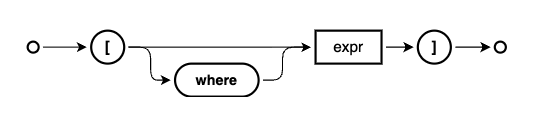
and we talk a little about:
- the
wherekeyword, which is optional and often omitted, similar to other keywords in CDL such as define. - the main part which is an expression, which is thus essentially "anything"
This latter point means that, depending on the context used, infix filters will be materialised into different shapes.
Materialisation in DDL
To illustrate this somewhat, and to round this section out, at
38:18 Patrice modifies
the infix filter condition in the CDL for the books projection to be
dateOfBirth > 19001:
entity Books       as
  projection on my.Books {
    *,
    author[dateOfBirth > 1900].{
      name as thename,
      dateOfBirth
    }
  }
  excluding {
    createdBy,
    modifiedBy
  };
This has the effect that the DDL for the corresponding view in HANA is defined like this:
VIEW CatalogService_Books AS SELECT
  Books_0.createdAt,
  Books_0.modifiedAt,
  Books_0.title,
  Books_0.ID,
  Books_0.descr,
  Books_0.author_ID,
  Books_0.genre_ID,
  Books_0.stock,
  Books_0.price,
  Books_0.currency_code,
  author_1.name AS thename,
  author_1.dateOfBirth AS dateOfBirth
FROM (
  sap_capire_bookshop_Books AS Books_0
  LEFT JOIN sap_capire_bookshop_Authors AS author_1
    ON
      (Books_0.author_ID = author_1.ID)
      AND
      (author_1.dateOfBirth > 1900)
)
The infix filter is mixed in to the main foreign key matching part of the ON
condition.
Infix filters in the FROM clause
Infix filters can also be used in the FROM clause in queries, as Patrice shows at
43:35:
> await cds.ql`
  SELECT from ${Books}[where stock between 50 and 100]
  { title, stock }
  `
[
  { title: 'Wuthering Heights', stock: 95 },
  { title: 'Jane Eyre', stock: 78 },
  { title: 'The Alloy of Law', stock: 67 },
  { title: 'Shadows of Self', stock: 89 },
  { title: 'Mistborn: Secret History', stock: 98 }
]
This is a nice syntactic sugar based variant, made even better by the use of
the optional where, so we can read the entire construct (entity, infix filter
condition and then the postfix projection) naturally, rather than e.g.:
> await cds.ql`
  SELECT from ${Books}
  { title, stock }
  where stock between 50 and 100
  `
These variants are the same, which we can see if we compare their intermediate
SQL (via forSQL()):
cds.ql {
  SELECT: {
    from: { ref: [ 'sap.capire.bookshop.Books' ], as: '$B' },
    columns: [ { ref: [ '$B', 'title' ] }, { ref: [ '$B', 'stock' ] } ],
    where: [
      { ref: [ '$B', 'stock' ] },
      'between',
      { val: 50 },
      'and',
      { val: 100 }
    ]
  }
}
Combining the scoped syntax with infix filters
To drive home two of the key concepts we've looked at, Patrice now combines
them, starting at 47:15.
In other words, taking the scoped syntax variant of the FROM clause with a
path expression constructed with a colon, and adding an infix filter.
To illustrate this and start simply, we first see this, which is just the scoped query part:
> q = cds.ql`SELECT from ${Books}:author { name }`
cds.ql {
  SELECT: {
    from: { ref: [ 'sap.capire.bookshop.Books', 'author' ] },
    columns: [ { ref: [ 'name' ] } ]
  }
}
> await q
[
  { name: 'Emily Brontë' },
  { name: 'Charlotte Brontë' },
  { name: 'Edgar Allen Poe' },
  { name: 'Richard Carpenter' },
  { name: 'Brandon Sanderson' },
  { name: 'J. R. R. Tolkien' }
]
This alone is worth dwelling on, when Patrice explains how he thinks about such
constructs - reading from right to left: "select those authors for whom exist
(at least one) book(s)". The selection is on the Authors entity, but it is
constrained by the books-authors relationship.
If there was an author in the database for whom there were no corresponding
book entries, this author would not be part of the result set. Rather than add
an entry to show this, Patrice now adds on to this query an infix filter for the
Books entity:
> q = cds.ql`
  SELECT from ${Books}[stock between 50 and 100]:author
  { name }
  `
Looking at the intermediate SQL, we can see that this stock based condition in
the infix filter becomes part of the WHERE clause of the subquery used in the
EXISTS:
> q.forSQL()
cds.ql {
  SELECT: {
    from: { ref: [ 'sap.capire.bookshop.Authors' ], as: '$a' },
    columns: [ { ref: [ '$a', 'name' ] } ],
    where: [
      'exists',
      {
        SELECT: {
          from: { ref: [ 'sap.capire.bookshop.Books' ], as: '$B' },
          columns: [ { val: 1 } ],
          where: [
            { ref: [ '$B', 'author_ID' ] },
            '=',
            { ref: [ '$a', 'ID' ] },
            'and',
            { ref: [ '$B', 'stock' ] },
            'between',
            { val: 50 },
            'and',
            { val: 100 }
          ]
        }
      }
    ]
  }
}
This has the expected effect - a reduced result set:
> await q
[
  { name: 'Emily Brontë' },
  { name: 'Charlotte Brontë' },
  { name: 'Brandon Sanderson' }
]
And the possibilities don't end there, of course, which Patrice shows at this point by gratuitously adding another infix clause thus:
> await cds.ql`
  SELECT from ${Books}[stock between 50 and 100]:author[order by name asc]
  { name }
  `
[
  { name: 'Brandon Sanderson' },
  { name: 'Charlotte Brontë' },
  { name: 'Emily Brontë' }
]
At this point in this writeup, I wonder about the contents of this second infix clause, in that it's not really a filter in the simple way I understand filters so I wanted to try to add something that feels more like an actual "restrictive" filter2, and that works too:
> await cds.ql`
  SELECT from ${Books}[stock between 50 and 100]:author[name like '%Brontë']
  { name }
  `
[
  { name: 'Emily Brontë' },
  { name: 'Charlotte Brontë' }
]
Disambiguating elements and their scoped named containers with colons
At 50:00 I ask Patrice
to explain a little bit more about the use of the colon (:) when constructing
a "fully qualified" element reference. Normally we would use a dot to express
traversal through a relationship, such as author.name. But when it comes to
including the "container" name, most commonly an entity, we must be precise and
unambiguous, especially in the context of how the compiler will interpret what
we express.
With the use of namespaces,
defined with either the namespace or context directives, or even just
expressed explicitly (e.g.
entity Foo.Bar { ... }), a question arises: "Where does the name of the
container end and the name of the element (path) start?". Sometimes, a colon
is needed to facilitate the answer to that question.
Here's an example. Consider this simple model:
namespace a;

context b.c {

  entity D {
    e : String;
  }

}
If we wanted to annotate the element e with @readonly3, we might write:
annotate a.b.c.D.e with @readonly;However, the compiler would emit a warning:
Artifact “a.b.c.D.e” has not been foundTo disambiguate where the "join" is, we use a colon4:
annotate a.b.c.D : e with @readonly;Summarising infix filters
At 52:58 Patrice gives a nice summary concerning infix filters, which can be employed in many places - everywhere that you can use paths, effectively - and are materialised differently depending on where and how they're used:
- in a
LEFT JOIN - in an
EXISTSsubquery - in a correlated subquery
Yes, it's not a coincidence that this is the same list that we considered at the start of this episode.
Here follows examples of each of those.
In a service projection (a JOIN example)
One of these places we saw was in the Books projection in the
CatalogService (see the Materialisation in DDL
section):
author[dateOfBirth > 1900].name as authorNameThis infix filter is materialised in the JOIN
VIEW CatalogService_Books AS SELECT
  ...
  Books_0.author_ID,
  ...
  author_1.name AS authorName,
  author_1.dateOfBirth AS dateOfBirth
FROM (
  sap_capire_bookshop_Books AS Books_0
  LEFT JOIN sap_capire_bookshop_Authors AS author_1
    ON (Books_0.author_ID = author_1.ID)
    AND (author_1.dateOfBirth > 1900)
)
In a scoped query (an EXISTS example)
The infix filter in the scoped query we saw earlier (see the Combining the scoped syntax with infix filters section):
> q = cds.ql`
  SELECT from ${Books}[stock between 50 and 100]:author
  { name }
  `
is pushed down and added to the EXISTS subquery when the query is
materialised; we can see this nicely even in the intermediate (CAP-style) SQL:
cds.ql {
  SELECT: {
    from: { ref: [ 'sap.capire.bookshop.Authors' ], as: '$a' },
    columns: [ { ref: [ '$a', 'name' ] } ],
    expand: 'root',
    orderBy: [ { ref: [ 'name' ], sort: 'asc' } ],
    where: [
      'exists',
      {
        SELECT: {
          from: { ref: [ 'sap.capire.bookshop.Books' ], as: '$B' },
          columns: [ { val: 1 } ],
          where: [
            { ref: [ '$B', 'author_ID' ] },
            '=',
            { ref: [ '$a', 'ID' ] },
            'and',
            { ref: [ '$B', 'stock' ] },
            'between',
            { val: 50 },
            'and',
            { val: 100 }
          ]
        }
      }
    ]
  }
}
In an expand construction (a correlated subquery example)
When the infix filter is used in the context of an expand (which will result in
a nested result set) then the filter (stock > 10) is pushed down into the
context of the subquery constructed for the expand, and added to the correlated
subquery's conditions.
> cds.ql`
  SELECT from ${Authors}
  { books[stock > 10] { title } }
  `.forSQL()
cds.ql {
  SELECT: {
    from: { ref: [ 'sap.capire.bookshop.Authors' ], as: '$A' },
    columns: [
      {
        SELECT: {
          from: { ref: [ 'sap.capire.bookshop.Books' ], as: '$b' },
          columns: [ { ref: [ '$b', 'title' ] } ],
          expand: true,
          one: false,
          where: [
            { ref: [ '$A', 'ID' ] },
            '=',
            { ref: [ '$b', 'author_ID' ] },
            'and',
            { ref: [ '$b', 'stock' ] },
            '>',
            { val: 10 }
          ]
        },
        as: 'books'
      }
    ]
  }
}
Expressiveness in infix filters
Rounding off this episode at around 57:13 Patrice shows how expressive infix filters can be, with:
> cds.ql`
  SELECT from ${Books}[
    stock between 50 and 100
    and exists genre[name = 'Fantasy']
  ]:author
  { name }
  `.forSQL()
cds.ql {
  SELECT: {
    from: { ref: [ 'sap.capire.bookshop.Authors' ], as: '$a' },
    columns: [ { ref: [ '$a', 'name' ] } ],
    where: [
      'exists',
      {
        SELECT: {
          from: { ref: [ 'sap.capire.bookshop.Books' ], as: '$B' },
          columns: [ { val: 1 } ],
          where: [
            { ref: [ '$B', 'author_ID' ] },
            '=',
            { ref: [ '$a', 'ID' ] },
            'and',
            { ref: [ '$B', 'stock' ] },
            'between',
            { val: 50 },
            'and',
            { val: 100 },
            'and',
            'exists',
            {
              SELECT: {
                from: { ref: [ 'sap.capire.bookshop.Genres' ], as: '$g' },
                columns: [ { val: 1 } ],
                where: [
                  { ref: [ '$g', 'ID' ] },
                  '=',
                  { ref: [ '$B', 'genre_ID' ] },
                  'and',
                  { ref: [ '$g', 'name' ] },
                  '=',
                  { val: 'Fantasy' }
                ]
              }
            }
          ]
        }
      }
    ]
  }
}
We can see how the extended, chained set of conditions is materialised:
- the stock condition becomes part of the
EXISTSsubquery's conditions - the genre condition becomes an additional correlated subquery which itself
then becomes part of the
EXISTSconditions too
That just about wraps it up for this episode, I hope you found some value in the video in these notes!
Further info
Footnotes
-
I find it interesting how we can use the
>operator ondateOfBirthand supply only the first part of a value i.e.1900, as if it were a string style comparison. -
Later on in this episode at 54:48 I ask whether we can add such an
order byin an infix filter at the schema level, and the answer helped me understand the difference between such "post-condition" filters and "restrictive". The answer was "no, not yet", but included an explanation which made a lot of sense - a restrictive filter (such asstock > 10) can be added to theWHEREcondition in the subquery orJOIN, whereas a "post-condition" filter (such asorder by name asc) cannot. The latter is only really possible right now at the query level. -
Of course, this example assumes we do not want to, or cannot, add the annotation directly to the element where it occurs (
@readonly e : String). -
The language server based CDS formatter has inserted the spaces either side of the colon, which is a nice touch.