Genres, cuids and a bit of AWK
Using AWK to process the Genres data from the CAP bookshop sample.
One of my goals this year is to learn more about the AWK programming language. I'm interested in not only the beauty of the language itself and the Unix history that surrounded it, but in how AWK shaped one of my favourite languages of all time, Perl.
In some ways AWK and CAP are similar, in that there's beauty, power and simplicity built in. These three attributes come about not least because it's about the code that you don't have to write; the language (AWK) and the framework (CAP) take care of much of the ceremony, allowing you to focus on the heart of the task at hand, and to write the smallest amount of code necessary to get the job done and minimise the maintenance burden for yourself.
Challenge
It's from the CAP context that a small challenge arose. The initial data
supplied with the "bookshop"
sample contains Books,
Authors and Genres. But I don't like the aesthetics of the Genre IDs; they're
GUIDs, as defined by the cuid aspect in the schema:
using {
  cuid,
  sap
} from '@sap/cds/common';

namespace sap.capire.bookshop;

/** Hierarchically organized Code List for Genres */
entity Genres : cuid, sap.common.CodeList {
  parent   : Association to Genres;
  children : Composition of many Genres
               on children.parent = $self;
}
The corresponding initial data (in db/data/sap.capire.bookshop.Genres.csv)
looks like this (many records have been omitted for brevity):
ID,parent_ID,name
10aaaaaa-aaaa-aaaa-aaaa-aaaaaaaaaaaa,,Fiction
11aaaaaa-aaaa-aaaa-aaaa-aaaaaaaaaaaa,10aaaaaa-aaaa-aaaa-aaaa-aaaaaaaaaaaa,Drama
12aaaaaa-aaaa-aaaa-aaaa-aaaaaaaaaaaa,10aaaaaa-aaaa-aaaa-aaaa-aaaaaaaaaaaa,Poetry
13aaaaaa-aaaa-aaaa-aaaa-aaaaaaaaaaaa,10aaaaaa-aaaa-aaaa-aaaa-aaaaaaaaaaaa,Fantasy
131aaaaa-aaaa-aaaa-aaaa-aaaaaaaaaaaa,13aaaaaa-aaaa-aaaa-aaaa-aaaaaaaaaaaa,Fairy Tale
132aaaaa-aaaa-aaaa-aaaa-aaaaaaaaaaaa,13aaaaaa-aaaa-aaaa-aaaa-aaaaaaaaaaaa,Epic Fantasy
133aaaaa-aaaa-aaaa-aaaa-aaaaaaaaaaaa,13aaaaaa-aaaa-aaaa-aaaa-aaaaaaaaaaaa,High Fantasy
134aaaaa-aaaa-aaaa-aaaa-aaaaaaaaaaaa,13aaaaaa-aaaa-aaaa-aaaa-aaaaaaaaaaaa,Gothic
14aaaaaa-aaaa-aaaa-aaaa-aaaaaaaaaaaa,10aaaaaa-aaaa-aaaa-aaaa-aaaaaaaaaaaa,Science Fiction
141aaaaa-aaaa-aaaa-aaaa-aaaaaaaaaaaa,14aaaaaa-aaaa-aaaa-aaaa-aaaaaaaaaaaa,Utopian and Dystopian
1411aaaa-aaaa-aaaa-aaaa-aaaaaaaaaaaa,141aaaaa-aaaa-aaaa-aaaa-aaaaaaaaaaaa,Utopian
1412aaaa-aaaa-aaaa-aaaa-aaaaaaaaaaaa,141aaaaa-aaaa-aaaa-aaaa-aaaaaaaaaaaa,Dystopian
14121aaa-aaaa-aaaa-aaaa-aaaaaaaaaaaa,1412aaaa-aaaa-aaaa-aaaa-aaaaaaaaaaaa,Cyberpunk
141211aa-aaaa-aaaa-aaaa-aaaaaaaaaaaa,14121aaa-aaaa-aaaa-aaaa-aaaaaaaaaaaa,Steampunk
...
18aaaaaa-aaaa-aaaa-aaaa-aaaaaaaaaaaa,10aaaaaa-aaaa-aaaa-aaaa-aaaaaaaaaaaa,Short Story
19aaaaaa-aaaa-aaaa-aaaa-aaaaaaaaaaaa,10aaaaaa-aaaa-aaaa-aaaa-aaaaaaaaaaaa,Graphic Novel
20aaaaaa-aaaa-aaaa-aaaa-aaaaaaaaaaaa,,Non-Fiction
21aaaaaa-aaaa-aaaa-aaaa-aaaaaaaaaaaa,20aaaaaa-aaaa-aaaa-aaaa-aaaaaaaaaaaa,Biography
22aaaaaa-aaaa-aaaa-aaaa-aaaaaaaaaaaa,21aaaaaa-aaaa-aaaa-aaaa-aaaaaaaaaaaa,Autobiography
23aaaaaa-aaaa-aaaa-aaaa-aaaaaaaaaaaa,20aaaaaa-aaaa-aaaa-aaaa-aaaaaaaaaaaa,Essay
24aaaaaa-aaaa-aaaa-aaaa-aaaaaaaaaaaa,20aaaaaa-aaaa-aaaa-aaaa-aaaaaaaaaaaa,Speech
This hurts my eyes, and I wanted to rebuild this dataset with integer IDs, while keeping the same hierarchy1. As a bonus, I wanted to be able to visualise that hierarchy too.
Exploration
While I was on a similar journey to learn more about jq, I built an interactive jq REPL style data explorer, using tools in my personal development environment (i.e. my Unix shell). I described that explorer (called jqte) in the blog post A simple jq REPL with tmux, bash, vim and entr.
I found jqte so useful that I thought a similar AWK REPL style data explorer
would be useful too, so I created one, called
ate (AWK terminal
explorer, I guess).
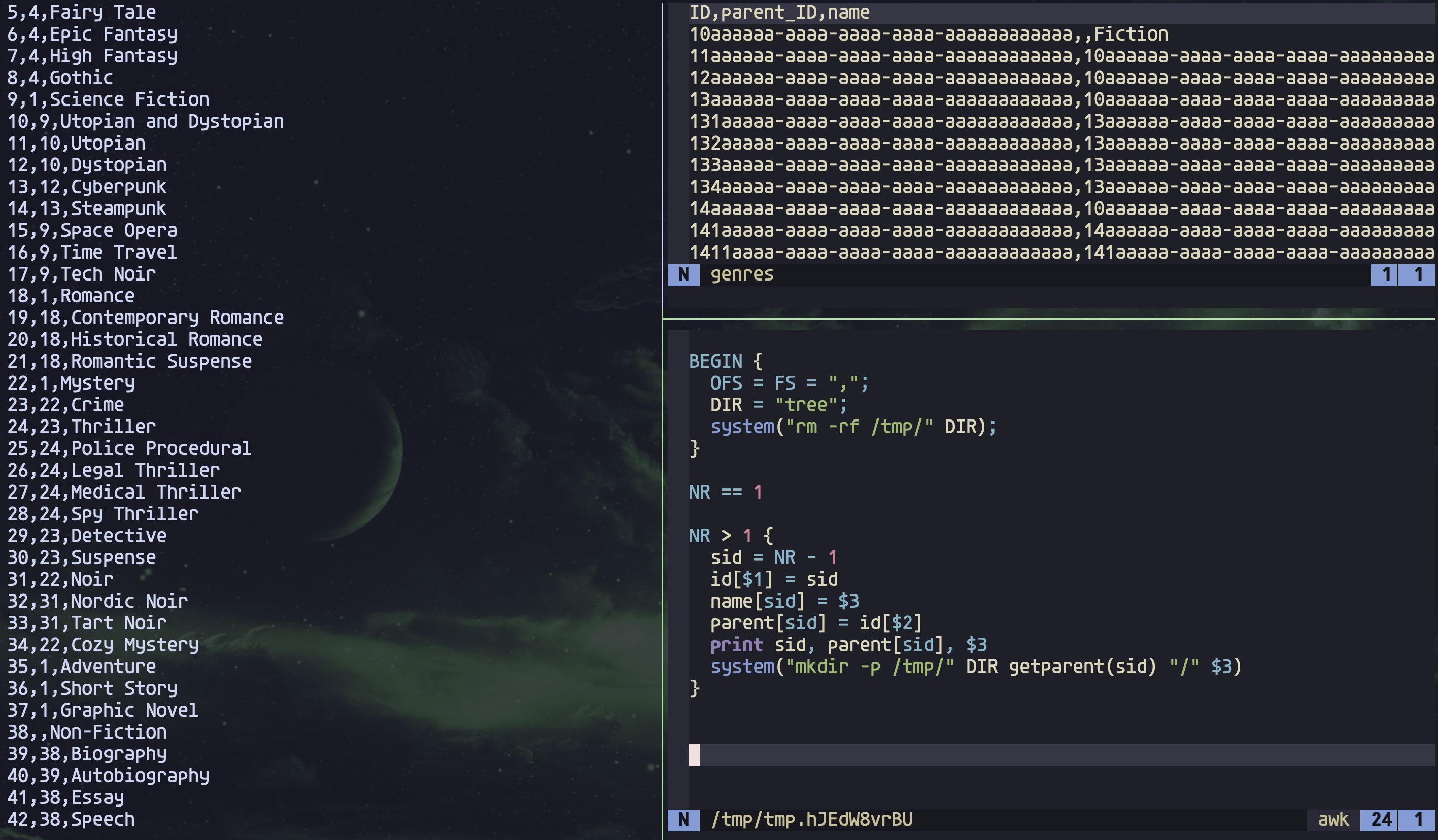
It's great, because:
- I can see the original data (top right)
- I get immediate feedback and output (left) ...
- ... as soon as I modify any of my AWK incantations (bottom right)
Solution
Here's the AWK script I came up with, bearing in mind that I've not written very much AWK at all, and probably most of what I have written has been very simple, in one-liners. I have written some notes below on how the script works.
#!/usr/bin/awk -f

# - Reads in a CSV file of genres
# - Emits a version with "clean(er)" IDs
# - Creates a directory tree (in /tmp/genres/) representing the hierarchy

function getparent(sid) {
  if (! parent[sid]) return ""
  return getparent(parent[sid]) "/" name[parent[sid]]
}

BEGIN {
  OFS = FS = ",";
  DIR = "genres";
  system("rm -rf /tmp/" DIR);
}

NR == 1

NR > 1 {
  sid = NR - 1
  id[$1] = sid
  name[sid] = $3
  parent[sid] = id[$2]
  print sid, parent[sid], $3
  system("mkdir -p '/tmp/" DIR getparent(sid) "/" $3 "'")
}
This script turns the above CSV records into ones that have (to me) much more pleasant identifiers:
ID,parent_ID,name
1,,Fiction
2,1,Drama
3,1,Poetry
4,1,Fantasy
5,4,Fairy Tale
6,4,Epic Fantasy
7,4,High Fantasy
8,4,Gothic
9,1,Science Fiction
10,9,Utopian and Dystopian
11,10,Utopian
12,10,Dystopian
13,12,Cyberpunk
14,13,Steampunk
...
36,1,Short Story
37,1,Graphic Novel
38,,Non-Fiction
39,38,Biography
40,39,Autobiography
41,38,Essay
42,38,Speech
You may have noticed the system( ... ) call in the script. This is related to
the visualisation part of the challenge.
To address this part, I had decided not to reinvent any wheels and use the
venerable tree facility
available almost everywhere, which is designed to show files and directories in
a hierarchical view. So all I needed was to create a hierarchy of directories,
where each directory was a genre, with optional parent and children, and then
display it with tree. The result looks like this:
/tmp/genres/
├── Fiction
│   ├── Adventure
│   ├── Drama
│   ├── Fantasy
│   │   ├── Epic Fantasy
│   │   ├── Fairy Tale
│   │   ├── Gothic
│   │   └── High Fantasy
│   ├── Graphic Novel
│   ├── Mystery
│   │   ├── Cozy Mystery
│   │   ├── Crime
│   │   │   ├── Detective
│   │   │   ├── Suspense
│   │   │   └── Thriller
│   │   │       ├── Legal Thriller
│   │   │       ├── Medical Thriller
│   │   │       ├── Police Procedural
│   │   │       └── Spy Thriller
│   │   └── Noir
│   │       ├── Nordic Noir
│   │       └── Tart Noir
│   ├── Poetry
│   ├── Romance
│   │   ├── Contemporary Romance
│   │   ├── Historical Romance
│   │   └── Romantic Suspense
│   ├── Science Fiction
│   │   ├── Space Opera
│   │   ├── Tech Noir
│   │   ├── Time Travel
│   │   └── Utopian and Dystopian
│   │       ├── Dystopian
│   │       │   └── Cyberpunk
│   │       │       └── Steampunk
│   │       └── Utopian
│   └── Short Story
└── Non-Fiction
    ├── Biography
    │   └── Autobiography
    ├── Essay
    └── Speech
Notes
Here are some notes on the content of the script, the small size of which is a testament to the power, beauty and simplicity of AWK and the Unix toolset, rather than any skill of mine.
- Records, which contain fields, are processed one by one in AWK.
- There's a
PATTERN - ACTIONpair approach to thinking about what you want to happen for each record. - In each pair's case, the pattern come first, then the corresponding action is
defined in a
{ ... }block. - If the pattern matches, then the action is carried out.
- There are special patterns, one of which,
BEGIN, I use here to set a few things up. - There are many built-in variables; in the
BEGINsection I'm setting the (input) field separatorFSand the output field separatorOFS; also used in this script isNRwhich is the number of the record being currently processed. - As well as these built-in "system" variables, the variables
$1,$2,$3and so on refer to the individual fields in a record (and$0refers to the entire record) - AWK can make system calls, as you can also see here where I remove any
previously created directory hierarchy in
/tmp/genres/at the start. - The default action is to print the entire record, which I use for the first
record (pattern
NR == 1) to pass through the CSV header line to the output untouched - Processing is done for each of the actual CSV records (where the pattern
NR > 1holds true, basically), where I derive a simple (integer) ID insidand then create lookups (using AWK's array structure which is associative) for the IDs, genre names, and genre parents (where appropriate). - Variables (including arrays) benefit from autovivification2, which means I don't need to worry about declaring or initialising anything.
- The
printstatement is where I output the CSV records each with their (and their parent's) simpler IDs. - I also invoke a
mkdircommand to create a directory within/tmp/genres/to represent the current genre. - The core of this relies on the
getparentfunction defined at the top, which recursively backtracks to derive the complete parent path.
Wrapping up
I am still fascinated by the simplicity of command line tools, flat file data processing and little languages like AWK, whose size belies its power and utility.
If you want to learn a little more about AWK, I would definitely recommend the paper Awk - A Pattern Scanning and Processing Language, concise and compact, just like AWK.
Footnotes
- Yes I know there's also a corresponding
.texts.csvfile that I should also convert, but I would rather just delete this file, as it's just initial data for testing in all cases, anyway. I may also want to change the type of theGenres:IDelement toIntegeritself. But basically, this excursion was more about AWK than genre data. - It's fascinating that the linked Wikipedia page entry on autovivification specifically refers to Perl which as I've mentioned was heavily influenced by AWK as well as other contemporary languages and tools.