CDS expressions in CAP - notes on Part 4
Notes to accompany Part 4 of the mini-series on the core expression language in CDS.
See the series post for an overview of all the episodes.
Introduction
00:00 Introduction and recap from last time.
07:00 Patrice revisits the syntax diagram and starts to explain the insignificant-looking but very significant (in terms of power and utility) "ref" box in that diagram, which is the start of our journey to understand path expressions.
In fact, the box label "ref" at the time this episode was being broadcast has now been replaced with "path expression" in the latest incarnation of the syntax diagram in Capire:
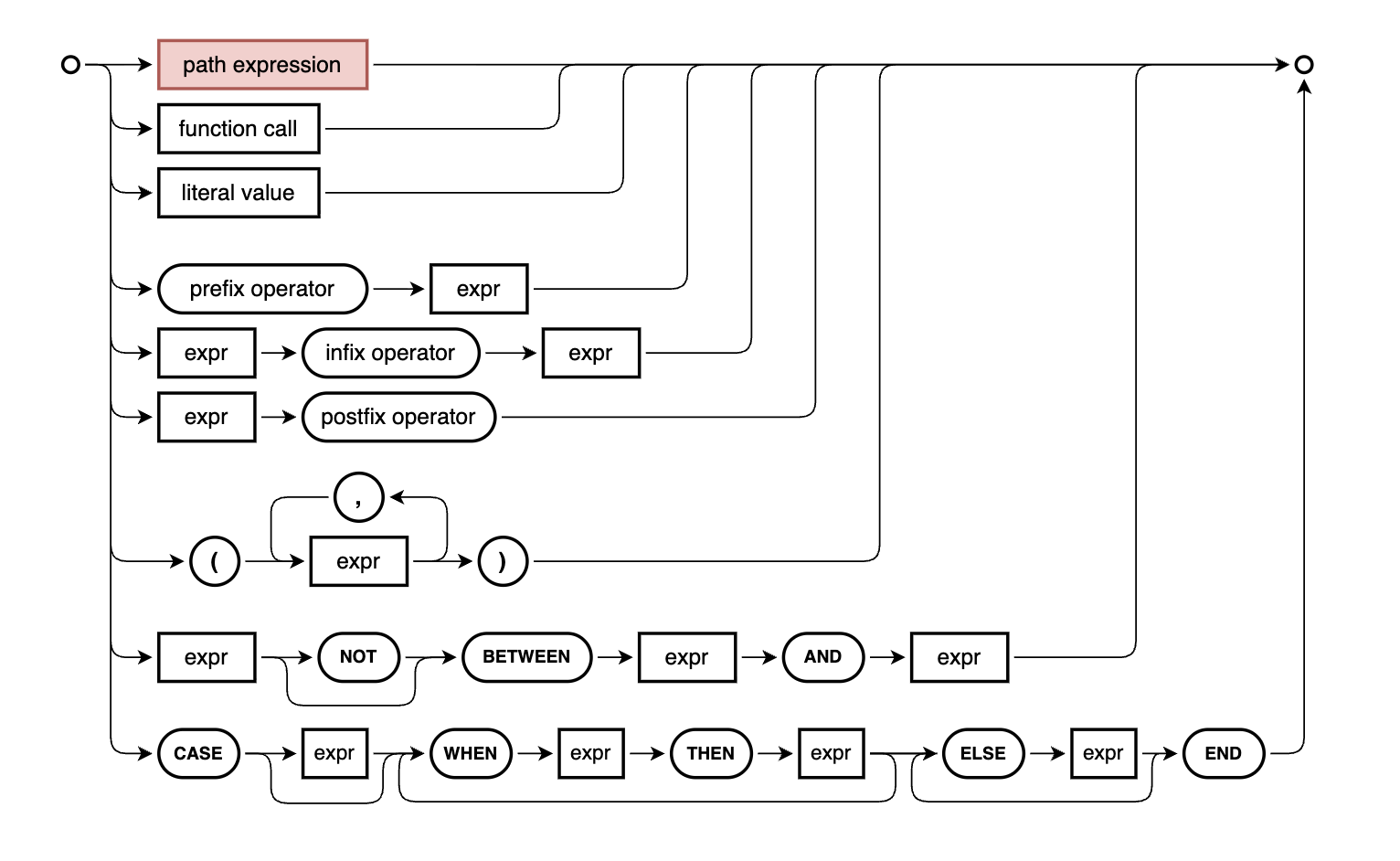
Selecting this box leads to the Path Expressions (ref) section of the CXL topic.
Some syntactic sugar for the case-when-then-else-end expression
10:08 Patrice revisits
the CASE ... WHEN ... THEN ... ELSE ... END expression, which we looked at
first in part
2
but for which there's some nice syntactic sugar.
He starts with passing a simple CXL example to the context-free parser
(cds.parse.expr), which emits the corresponding CXN:
> cds.parse.expr`
  case when stock > 10 then 'non-seller' else 'sells quickly' end
  `
{
  xpr: [
    'case',
    'when',
    { ref: [ 'stock' ] },
    '>',
    { val: 10 },
    'then',
    { val: 'non-seller' },
    'else',
    { val: 'sells quickly' },
    'end'
  ]
}
Using the syntactic sugar, Patrice then shows us that we can write the same expression using a construct familiar in JavaScript and other languages:
> cds.parse.expr`
  stock > 10 ? 'non seller' : 'sells quickly'
  `
{
  xpr: [
    'case',
    'when',
    { ref: [ 'stock' ] },
    '>',
    { val: 10 },
    'then',
    { val: 'non seller' },
    'else',
    { val: 'sells quickly' },
    'end'
  ]
}
This version of the CXL expression is actually exactly the same in the internal
(CXN) machine-readable form. Not only that, but this ? : is nestable too:
> cds.parse.expr`
  stock > 10
  ? (price > 50 ? 'expensive non seller' : 'cheap non seller')
  : 'sells quickly'
  `
{
  xpr: [
    'case',
    'when',
    { ref: [ 'stock' ] },
    '>',
    { val: 10 },
    'then',
    {
      xpr: [
        'case',
        'when',
        { ref: [ 'price' ] },
        '>',
        { val: 50 },
        'then',
        { val: 'expensive non seller' },
        'else',
        { val: 'cheap non seller' },
        'end'
      ]
    },
    'else',
    { val: 'sells quickly' },
    'end'
  ]
}
A closer look at the predicate expressions
15:15 The last thing that Patrice talks about before jumping into path expressions is the collection of predicates, which we very briefly noted in the previous episode.
First, we look at the BETWEEN predicate, by first considering an compound
expression that describes a closed interval, to check for stock between 10 and
30:
> cds.parse.expr`
  stock >= 10 and stock <= 30
  `
{
  xpr: [
    { ref: [ 'stock' ] },
    '>=',
    { val: 10 },
    'and',
    { ref: [ 'stock' ] },
    '<=',
    { val: 30 }
  ]
}
Here we have two binary operator based expressions (with the comparison
operators >= and <=) that are joined with (and become the operands for)
another binary operator, the logical operator and.
In contrast, there's the range checking operator between, which we can use
instead:
> cds.parse.expr`
  stock between 12 and 34
  `
{
  xpr: [ { ref: [ 'stock' ] }, 'between', { val: 12 }, 'and', { val: 34 } ]
}
Not only is this a single expression, it is also much neater and (arguably) easier to read as well as write.
Here's that expression in action, in a query:
> await cds.ql`
  select from Books { title, stock } where stock between 12 and 34
  `
[
  { title: 'Mistborn: The Final Empire', stock: 12 },
  { title: 'The Two Towers', stock: 14 }
]
There's also the not variant which is also available.
20:30 Next up is IN,
which Patrice first demonstrates in an abstract way with:
> cds.parse.expr` (1, 2, 3) in (select ID from Books)`
{
  xpr: [
    { list: [ { val: 1 }, { val: 2 }, { val: 3 } ] },
    'in',
    {
      SELECT: {
        from: { ref: [ 'Books' ] },
        columns: [ { ref: [ 'ID' ] } ]
      }
    }
  ]
}
but then goes on to show the operator employed in a more practical example:
> q = cds.ql`
  select from ${Books} { title, stock }
  where (author.ID) in
    (select ID from ${Authors} where dateOfDeath is null)
  `
cds.ql {
  SELECT: {
    from: { ref: [ 'sap.capire.bookshop.Books' ] },
    columns: [ { ref: [ 'title' ] }, { ref: [ 'stock' ] } ],
    where: [
      { ref: [ 'author', 'ID' ] },
      'in',
      {
        SELECT: {
          from: { ref: [ 'sap.capire.bookshop.Authors' ] },
          columns: [ { ref: [ 'ID' ] } ],
          where: [ { ref: [ 'dateOfDeath' ] }, 'is', 'null' ]
        }
      }
    ]
  }
}
Here, the ID of the author association (via author_ID, effectively) is
matched to the set of values from the (select ID from ...) subquery:
> await q
[
  { title: 'Mistborn: The Final Empire', stock: 12 },
  { title: 'The Well of Ascension', stock: 8 },
  { title: 'The Hero of Ages', stock: 5 },
  { title: 'The Alloy of Law', stock: 67 },
  { title: 'Shadows of Self', stock: 89 },
  { title: 'The Bands of Mourning', stock: 134 },
  { title: 'The Lost Metal', stock: 156 },
  { title: 'Mistborn: Secret History', stock: 98 },
  { title: 'The Way of Kings', stock: 7 },
  { title: 'Words of Radiance', stock: 4 },
  { title: 'Edgedancer', stock: 125 },
  { title: 'Oathbringer', stock: 3 },
  { title: 'Dawnshard', stock: 142 },
  { title: 'Rhythm of War', stock: 6 },
  { title: 'Wind and Truth', stock: 2 }
]
Moreover, the expression (author.ID) could have been written as author.ID
i.e. as a path expression, rather than a path expression within a list context,
which Patrice explains at
24:45, and also
clarifies at 27:59 that
the subquery is indeed an expression (it is, according to the syntax diagram) -
a "query expression".
A first look at path expressions
There's also the EXISTS predicate which we will want to take a look at, but
because this is most often found in use with path expressions, Patrice takes us
on our first excursion to explore their power and utility, starting at
29:30, with a simple
example (some results omitted for brevity here):
> q = cds.ql`SELECT from ${Authors} {name as author, books.title }`
cds.ql {
  SELECT: {
    from: { ref: [ 'sap.capire.bookshop.Authors' ] },
    columns: [
      { ref: [ 'name' ], as: 'author' },
      { ref: [ 'books', 'title' ] }
    ]
  }
}
> await q
[
  { author: 'Emily Brontë', books_title: 'Wuthering Heights' },
  { author: 'Charlotte Brontë', books_title: 'Jane Eyre' },
  { author: 'Edgar Allen Poe', books_title: 'Eleonora' },
  { author: 'Edgar Allen Poe', books_title: 'The Raven' },
  { author: 'Richard Carpenter', books_title: 'Catweazle' },
  { author: 'Brandon Sanderson', books_title: 'Dawnshard' },
  { author: 'Brandon Sanderson', books_title: '...' },
  { author: 'Brandon Sanderson', books_title: 'Words of Radiance' },
  { author: 'J. R. R. Tolkien', books_title: 'Beren and Lúthien' },
  { author: 'J. R. R. Tolkien', books_title: '...' },
  { author: 'J. R. R. Tolkien', books_title: 'Unfinished Tales' }
]
This is a "flat" list, i.e. all of the authors + book combinations.
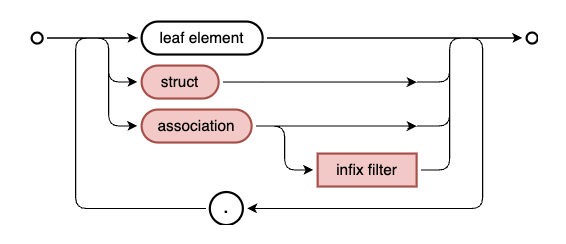
To help our understanding, Patrice then highlights the diagram specifically for path expressions, which looks like this:
A brief digression on the term "forward declared join"
At this point (32:30)
I'm unable to resist surfacing a phrase that is also used in this context, and
that is "forward declared join", which Daniel Hutzel and I touched upon in
part 9 of The Art and Science of
CAP. Patrice nicely
explains what this term is, and how the concept it represents, is present in
the model that we're using, for example in the definition of the Authors
entity (some elements omitted here for brevity):
entity Authors : managed {
  key ID            : Integer;
      name          : String(111) @mandatory;
      books         : Association to many Books
                        on books.author = $self;
}
The "on condition" for the books element definition is a sign that some
correlation is going to be involved (as Patrice rightly points out, correlation
is at the heart of any RDBMS); what's more, that correlation connecting
Authors to Books is defined ahead of time, before any actual manifestation
of the JOIN mechanism that will be required to realise the correlation.
Digging deeper into path expressions
Turning back to the path expression we had in SELECT from ${Authors} {name as author, books.title },
Patrice had pointed out that this query is not directly possible (in its current,
simple form) in SQL, as books.title traverses a path from one entity to
another.
Indeed, at 36:07 we see
what this query is going to become by using the forSQL() method on the query
object, where we see a LEFT JOIN is planned in the SELECT specification, in
this SQL-style CQN version of the query:
> q.forSQL()
cds.ql {
  SELECT: {
    from: {
      join: 'left',
      args: [
        { ref: [ 'sap.capire.bookshop.Authors' ], as: 'Authors' },
        { ref: [ 'sap.capire.bookshop.Books' ], as: 'books' }
      ],
      on: [
        { ref: [ 'books', 'author_ID' ] },
        '=',
        { ref: [ 'Authors' , 'ID' ] }
      ]
    },
    columns: [
      { ref: [ 'Authors' , 'name' ], as: 'author' },
      { ref: [ 'books', 'title' ], as: 'books_title' }
    ]
  }
}
Note that the name of the association element books becomes the alias for the
target of the traversal.
So here we're seeing the time element of a forward declared join i.e. a path
expression, in that the join is manifested "just in time". By the way, with
toSQL() we can see that the actual database engine specific SQL (SQLite in
this case) looks like this (with the json_insert removed):
SELECT
  Authors.name as author,
  books.title as books_title
FROM
  sap_capire_bookshop_Authors as Authors
  left JOIN sap_capire_bookshop_Books as books
    ON books.author_ID = Authors.ID
Association-like calculated element
40:16 Building on this
knowledge and what we learned last week, Patrice now adds a further element to
the Authors entity definition, called nonSeller. And what a remarkable one!
Here it is (again, with other elements removed for brevity):
entity Authors : managed {
  key ID            : Integer;
      name          : String(111) @mandatory;
      books         : Association to many Books
                        on books.author = $self;

      nonSeller = books[ stock > 100 ];

      isAlive       : Boolean = dateOfDeath is null ? true : false;
      age           : Integer = years_between(
        dateOfBirth, coalesce(
          dateOfDeath, current_date
        )
      );
}
This nonSeller element builds upon an existing association (books), and
adds a condition in an infix filter ([stock > 100]). The syntax used for this
definition basically follows the calculated element pattern. Patrice and I
discussed the type, which is derived from the referenced element (books).
Additionally, the "on" condition in that referenced element is, for
nonSeller, enhanced by the infix filter. This is exactly what's shown in the
bottom part of the path expression syntax diagram shown
earlier.
Essentially this new element nonSeller is still an association, and can
therefore be used in path expressions just like books, as Patrice
demonstrates at 43:46:
> q = cds.ql`SELECT from ${Authors} { name, nonSeller.title } `
cds.ql {
  SELECT: {
    from: { ref: [ 'sap.capire.bookshop.Authors' ] },
    columns: [ { ref: [ 'name' ] }, { ref: [ 'nonSeller', 'title' ] } ]
  }
}
Transforming the query into the normalised (intermediate) format, we see:
> q.forSQL()
cds.ql {
  SELECT: {
    from: {
      join: 'left',
      args: [
        { ref: [ 'sap.capire.bookshop.Authors' ], as: 'Authors' },
        { ref: [ 'sap.capire.bookshop.Books' ], as: 'nonSeller' }
      ],
      on: [
        {
          xpr: [
            { ref: [ 'nonSeller', 'author_ID' ] },
            '=',
            { ref: [ 'Authors', 'ID' ] }
          ]
        },
        'and',
        {
          xpr: [ { ref: [ 'nonSeller', 'stock' ] }, '>', { val: 100 } ]
        }
      ]
    },
    columns: [
      { ref: [ 'Authors', 'name' ] },
      { ref: [ 'nonSeller', 'title' ], as: 'nonSeller_title' }
    ]
  }
}
We can see that there's a left join planned, and there is a set of "on" conditions in an array, two expressions:
- a correlation of the author ID across the two entities
- a comparison operator based condition on the stock value
In both cases the entities are referred to by their aliases.
48:00 The dataset returned from this query looks like this:
  { name: 'Emily Brontë', nonSeller_title: null },
  { name: 'Charlotte Brontë', nonSeller_title: null },
  { name: 'Edgar Allen Poe', nonSeller_title: 'Eleonora' },
  { name: 'Edgar Allen Poe', nonSeller_title: 'The Raven' },
  { name: 'Richard Carpenter', nonSeller_title: 'Catweazle' },
  { name: 'Brandon Sanderson', nonSeller_title: 'Dawnshard' },
  { name: 'Brandon Sanderson', nonSeller_title: 'Edgedancer' },
  { name: 'Brandon Sanderson', nonSeller_title: 'The Bands of Mourning' },
  { name: 'Brandon Sanderson', nonSeller_title: 'The Lost Metal' },
  { name: 'J. R. R. Tolkien', nonSeller_title: 'Beren and Lúthien' },
  { name: 'J. R. R. Tolkien', nonSeller_title: 'The Children of Húrin' },
  { name: 'J. R. R. Tolkien', nonSeller_title: 'The Fall of Gondolin' },
  { name: 'J. R. R. Tolkien', nonSeller_title: 'The Silmarillion' },
  { name: 'J. R. R. Tolkien', nonSeller_title: 'Unfinished Tales' }
]
We're driving this query from the Authors, with a(n implicit) LEFT JOIN,
which means that we are going to get all of the authors, including those (two
of the Brontë
sisters!)
for which there are no "non sellers", i.e. no books with more than 100 in
stock. We can deal with this in various ways, see the next
section.
51:02 Based on a question
from me going back to the CDL definition of nonSeller, and how it is basically
a reference to an existing element (books), Patrice shows that this is a
pattern that works generally. For example, we add an origin element that just
points to placeOfBirth:
entity Authors : managed {
  key ID            : Integer;
      name          : String(111) @mandatory;
      address       : Association to Addresses;
      academicTitle : String(111);
      dateOfBirth   : Date;
      dateOfDeath   : Date;
      placeOfBirth  : String;
      placeOfDeath  : String;
      books         : Association to many Books
                        on books.author = $self;

      nonSeller = books[stock > 100];

      origin = placeOfBirth;

      isAlive       : Boolean = dateOfDeath is null ? true : false;
      age           : Integer = years_between(
        dateOfBirth, coalesce(
          dateOfDeath, current_date
        )
      );
}
Essentially this is just another calculated element, albeit a very simple one! Patrice gives another example:
name          : String(111) @mandatory;
academicTitle : String(10);
fullName = academicTitle || ' ' || name;
The type of fullName here is implicit but we can make it explicit:
fullName : String = academicTitle || ' ' || name;like we have done for the isAlive and age elements.
A look at the EXISTS predicate
54:54 At this point we
go back to the dataset that was produced from the query SELECT from ${Authors} { name, nonSeller.title }, in particular with the two author records with
null for nonSeller_title. What if we wanted to exclude such authors, i.e. only
include authors with non-sellers?
Patrice first shows us an option that is available to us, but one which we probably want to avoid, as it is a little clumsy, involves a somewhat technical approach:
> await cds.ql`select from ${Authors} { name } where nonSeller.ID is not null`
[
  { name: 'Edgar Allen Poe' },
  { name: 'Edgar Allen Poe' },
  { name: 'Richard Carpenter' },
  { name: 'Brandon Sanderson' },
  { name: 'Brandon Sanderson' },
  { name: 'Brandon Sanderson' },
  { name: 'Brandon Sanderson' },
  { name: 'J. R. R. Tolkien' },
  { name: 'J. R. R. Tolkien' },
  { name: 'J. R. R. Tolkien' },
  { name: 'J. R. R. Tolkien' },
  { name: 'J. R. R. Tolkien' }
]
Moreover, there is still an issue with the authors that do have non-sellers - there are duplicate records returned. This is a natural consequence of the to-many relationship:
entity Authors : managed {
  key ID            : Integer;
      name          : String(111) @mandatory;

      ...

      books         : Association to many Books
                        on books.author = $self;

      nonSeller = books[stock > 100];

      ...
}
and is essentially the result of a LEFT JOIN that traverses it.
A much better approach is to use the prefix
operator EXISTS:
> await cds.ql`select from ${Authors} { name } where exists nonSeller`
[
  { name: 'Edgar Allen Poe' },
  { name: 'Richard Carpenter' },
  { name: 'Brandon Sanderson' },
  { name: 'J. R. R. Tolkien' }
]
This is almost magic! The expression used as the operand here is simply
nonSeller, i.e. a reference to the association, to the relationship. It's the
closest we can get to how we'd say it in English.
By now, we know how to look under the hood for this - we can trace the steps from this CQL and CXL ... through the various stages. First, here's what the "CAP style CQN" looks like:
> q = cds.ql`select from ${Authors} { name } where exists nonSeller`
cds.ql {
  SELECT: {
    from: { ref: [ 'sap.capire.bookshop.Authors' ] },
    columns: [ { ref: [ 'name' ] } ],
    where: [ 'exists', { ref: [ 'nonSeller' ] } ]
  }
}
Notice that the simple association name nonSeller here (as the target of
exists, i.e. { ref: [ 'nonSeller' ]}) is perfectly valid according to the
syntax diagram we looked at earlier in our first look at path
expressions.
Next, we can see the normalised "CAP style SQL":
> q.forSQL()
cds.ql {
  SELECT: {
    from: { ref: [ 'sap.capire.bookshop.Authors' ], as: 'Authors' },
    columns: [ { ref: [ 'Authors', 'name' ] } ],
    where: [
      'exists',
      {
        SELECT: {
          from: { ref: [ 'sap.capire.bookshop.Books' ], as: 'nonSeller' },
          columns: [ { val: 1 } ],
          where: [
            {
              xpr: [
                { ref: [ 'nonSeller', 'author_ID' ] },
                '=',
                { ref: [ 'Authors', 'ID' ] }
              ]
            },
            'and',
            { xpr: [ { ref: [ 'nonSeller', 'stock' ] }, '>', { val: 100 } ] }
          ]
        }
      }
    ]
  }
}
Here are some observations on this:
- the
SELECTis on theAuthorsentity, as we expect - the
WHEREclause is essentially theEXISTSpredicate - the predicate's target (or focus) is a complete subquery
- this subquery represents the association and is on the
Books - a Boolean value is expected from this subquery
- that value is represented by the dummy literal value
{ val: 1 }
What's not changed subquery's WHERE clause is exactly the same as what was in
the on clause in the earlier query in the previous association-like
calculated element section, representing
the combined conditions of books.author = $self and stock > 100.
So moving from a LEFT JOIN to an EXISTS with a subquery ... moves us from
duplicate data from the left part of the relationship, to unique values, as
what's returned from this subquery is either something ({ val: 1 }) or
nothing.
01:01:16 To underline the power and utility of this predicate, Patrice rounds the episode off with another example, contrasting the two approaches and result sets, based on the books from Brandon Sanderson, two of which include the word "Mistborn":
> await cds.ql`select title from ${Books} where author.name like '%Sanderson'`
[
  { title: 'Mistborn: The Final Empire' },
  { title: 'The Well of Ascension' },
  { title: 'The Lost Metal' },
  { title: 'Mistborn: Secret History' },
  { title: 'The Way of Kings' },
  { title: '...' },
  { title: 'Wind and Truth' }
]
First, the less convenient approach:
> q = cds.ql`select from ${Authors} { name } where books.title like '%Mistborn%'`
cds.ql {
  SELECT: {
    from: { ref: [ 'sap.capire.bookshop.Authors' ] },
    columns: [ { ref: [ 'name' ] } ],
    where: [ { ref: [ 'books', 'title' ] }, 'like', { val: '%Mistborn%' } ]
  }
}
> await q
[
  { name: 'Brandon Sanderson' },
  { name: 'Brandon Sanderson' }
]
And then the approach using EXISTS:
> q = cds.ql`SELECT from ${Authors} { name } where exists books[title like '%Mistborn%']`
cds.ql {
  SELECT: {
    from: { ref: [ 'sap.capire.bookshop.Authors' ] },
    columns: [ { ref: [ 'name' ] } ],
    where: [
      'exists',
      {
        ref: [
          {
            id: 'books',
            where: [ { ref: [ 'title' ] }, 'like', { val: '%Mistborn%' } ]
          }
        ]
      }
    ]
  }
}
> await q
[
  { name: 'Brandon Sanderson' }
]
The EXISTS predicate is an essential item in your expression toolkit for
checking across to-many relationships.
Further info
- Patrice also has some great notes for this part
- ← Previous
CDS expressions in CAP - notes on Part 3