Path expressions, nested projections, aggregations and expressions in queries with CQL and CXL in CAP
A brief exploration of some of the features of CAP's powerful query and expression languages, inspired by our journey into CXL in the current Hands-on SAP Dev series.
In Part 2 of our current Hands-on SAP Dev live stream series on CXL with Patrice Bender, Patrice took some time to give us a glimpse into the power that CQL and CXL offers. It was in the context of answering a question from one of the live stream viewers (thanks Stubbs!) in the previous part, and the answer revealed an inspiring landscape of possibilities.
In this post I want to revisit the question, which was about iterating over composition items in a query, with expressions.
The scenario
In October last year I published Modelling contained-in relationships with compositions in CDS, so I thought it would be nice to build on the sample in that post for this simplified setup1.
All we need is a a services.cds file in a simple CAP Node.js project, the
usual package.json, and some sample data in a test/data/
directory2.
Here's the entire CDS model in services.cds, which follows the use of
an anonymous aspect as the target of the composition, as explained in the
Implicit
modelling
section of the blog post.
context qmacro {

  entity Books {
    key ID    : Integer;
        title : String;
        price : Integer;
  }

  entity Orders {
    key ID    : Integer;
        Items : Composition of many {
                  key pos  : Integer;
                      qty  : Integer;
                      book : Association to Books;
                }
  }

}

service S {
  entity Orders as projection on qmacro.Orders;
}
What's different to the sample is that I've added a Books entity, so that we
have a further relationship level:
Model diagram
+--------+     +--------+     +--------+
| Orders |1---*| Items  |1---1| Books  |
+--------+     +--------+     +--------+
I've also now defined the entities within a context block, so that I can
keep the service definition separate, and use projections if I want to - the
context usefully lends a scope name (qmacro in this case) to the entities
so that the projection references don't clash with the service level entity
specifications.
Some sample data
Then, with cds add data --out test/data/, I can create the empty CSV files
that already have the column headers (shown after the # symbols):
test
└── data
    ├── qmacro-Books.csv         # ID,title,price
    ├── qmacro-Orders.csv        # ID
    └── qmacro-Orders.Items.csv  # up__ID,pos,qty,book_ID
Remember that
up__IDis the result of the concatenation of the generated element name for the parent pointer (up_) with the key element name of the parent (ID), using an underscore (_) to join them together.
The actual book and order CSV records can be viewed in Appendix A.
Exploring in the cds REPL
Using the cds REPL gives developers a superpower3, and this is amply demonstrated throughout the series by Patrice. So let's follow Patrice's lead and explore what we have using the cds REPL.
cds repl --run .The cds REPL starts and a CAP server is fired up automatically for the current
project (thanks to the --run . option), with automatic reflections:
from cds.entities: {
}

from cds.services: {
  db,
  S,
}
Starting simple
We can examine the Orders entity via the service S which is in the
cds.services list, for example like this:
> S.entities.Orders
entity {
  kind: 'entity',
  elements: LinkedDefinitions {
    ID: Integer { key: true, type: 'cds.Integer' },
    Items: Composition {
      type: 'cds.Composition',
      cardinality: { max: '*' },
      targetAspect: {
        elements: {
          pos: { key: true, type: 'cds.Integer' },
          qty: { type: 'cds.Integer' }
        }
      },
      target: 'S.Orders.Items',
      on: [ { ref: [ 'Items', 'up_' ] }, '=', { ref: [ '$self' ] } ]
    }
  }
}
In a query, we can also of course simply refer to it by its fully qualified name which includes the service name as prefix. Let's try a simple one to start with:
> await cds.ql `SELECT from S.Orders`
[ { ID: 1 }, { ID: 2 }, { ID: 3 } ]
So far, so good.
A first look at the items
Let's now expand (I chose that word deliberately) into the items. How about starting with a bit of denormalisation, asking for a flat list of order IDs and item positions:
> await cds.ql `SELECT ID, Items.pos from S.Orders`
[
  { ID: 1, Items_pos: 10 },
  { ID: 1, Items_pos: 20 },
  { ID: 2, Items_pos: 10 },
  { ID: 3, Items_pos: 10 },
  { ID: 3, Items_pos: 20 },
  { ID: 3, Items_pos: 30 }
]
This isn't the approach that Patrice took in expressing the query, it's more of
a traditional SQL-like statement ordering. But the query language parser still
allows us to use CQL affordances with this style, such as the path expression
Items.pos which traverses the composition here.
What Patrice used was the postfix notation ({ ... }) within which we can put
our projection (the details of the SELECT clause):
SELECT from S.Orders { ID, Items.pos }This produces the same result set. And this postfix notation approach makes it easier to construct and think about more complex queries, which we'll do next.
Structural expansion
Rather than the flattened list of order IDs and item positions, we can nest a projection:
> await cds.ql `SELECT from S.Orders { ID, Items { pos as p, qty } }`
[
  { ID: 1, Items: [ { p: 10, qty: 5 }, { p: 20, qty: 10 } ] },
  { ID: 2, Items: [ { p: 10, qty: 50 } ] },
  { ID: 3, Items: [ { p: 10, qty: 3 }, { p: 20, qty: 4 }, { p: 30, qty: 1 } ] }
]
This allows us to express and request structure which is reflected here in the result set.
Further model traversal
We can travel further through the model with ease, as shown
in this example with a dotted path expression (book.title):
> await cds.ql `
SELECT from S.Orders { ID, Items { qty, book.title as book } }
`
[
  {
    ID: 1,
    Items: [
      { qty: 5, book: "The Hitchhiker's Guide To The Galaxy" },
      { qty: 10, book: 'The Restaurant at the End of the Universe' }
    ]
  },
  {
    ID: 2,
    Items: [
      { qty: 50, book: 'Life, the Universe and Everything' }
    ]
  },
  {
    ID: 3,
    Items: [
      { qty: 3, book: "The Hitchhiker's Guide To The Galaxy" },
      { qty: 4, book: 'Mostly Harmless' },
      { qty: 1, book: 'And Another Thing...' }
    ]
  }
]
It's worth pausing here to reflect on how powerful, expressive and simple this
is, compared to what we'd be required to write from a JOIN perspective in SQL.
Alternatively, note that projections can be nested arbitrarily:
> await cds.ql `
SELECT from S.Orders { ID, Items { qty, book { title } } }
`
[
  {
    ID: 1,
    Items: [
      { qty: 5, book: { title: "The Hitchhiker's Guide To The Galaxy" } },
      { qty: 10, book: { title: 'The Restaurant at the End of the Universe' } }
    ]
  },
  {
    ID: 2,
    Items: [
      { qty: 50, book: { title: 'Life, the Universe and Everything' } }
    ]
  },
  {
    ID: 3,
    Items: [
      { qty: 3, book: { title: "The Hitchhiker's Guide To The Galaxy" } },
      { qty: 4, book: { title: 'Mostly Harmless' } },
      { qty: 1, book: { title: 'And Another Thing...' } }
    ]
  }
]
Using an expression
During the series, Patrice explained that CDL and CQL are "vehicles" that can carry CXL. In other words, expressions can be used both at design time, in the CDS model, within your CDL, and at runtime, in queries, within your CQL.
The expression he added in the context of the answer here was a "price x quantity" calculation. It was within an aggregation, but we'll come to that next, separately.
First, let's just use such an expression, with *, one of the supported
binary operators. We must
complete the expression with the declaration of an alias (otherwise, how could
the query be resolved ... we'd get an "Expecting expression to have an alias name"
error):
> await cds.ql `
SELECT from S.Orders { ID, Items { pos as p, book.price * qty as cost} }
`
[
  { ID: 1, Items: [ { p: 10, cost: 25 }, { p: 20, cost: 50 } ] },
  { ID: 2, Items: [ { p: 10, cost: 250 } ] },
  { ID: 3, Items: [ { p: 10, cost: 15 }, { p: 20, cost: 20 }, { p: 30, cost: 5 } ] }
]
Using an aggregation
The previous query and result set illustrated an expression within a nested projection, referencing a path expression, for each order item (position). The question, however, was about total values.
Patrice showed this was also possible, using one of a number of portable functions that are provided. These functions can be used in constructing expressions, and can be supplied with expressions as arguments:
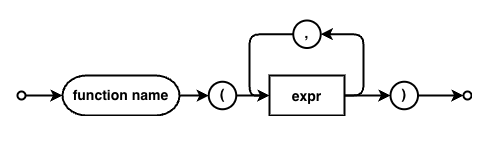
The main aggregate functions are avg(), min(), max(), count() and sum().
Let's use sum():
> await cds.ql `
SELECT from S.Orders { ID, Items { sum(book.price * qty) as tot } }
`
[
  { ID: 1, Items: [ { tot: 75 } ] },
  { ID: 2, Items: [ { tot: 250 } ] },
  { ID: 3, Items: [ { tot: 40 } ] }
]
Adding a group by partition
If you were watching this section of Part
2 closely, you'll have noticed that
Patrice also used a group by partitioning using an infix notation. Here's the
equivalent in this scenario:
> await cds.ql `
SELECT from S.Orders { ID, Items[group by up__ID] { sum(book.price * qty) as tot } }
`
[
  { ID: 1, Items: [ { tot: 75 } ] },
  { ID: 2, Items: [ { tot: 250 } ] },
  { ID: 3, Items: [ { tot: 40 } ] }
]
Bonus: Patrice told me that instead of the explicit
up__ID, we can actually just use the name of the reverse association4 on its own, i.e.Items[group by up_], and the database service will sort out the foreign key flattening for us.
There's no change. We got the same result set without the group by. But
that's only because the aggregate function is operating on the entire
result set, and the context of the cds REPL here is a CAP server in development
mode, i.e. using a SQLite database, which is rather lenient. Postgres requires
a group by if there are other elements in the result set not subject to the
aggregation, and HANA is a different beast altogether. So it's good practice to
be explicit with your partitioning.
Examining the query
Before we finish, let's take a quick look at what this query looks like
"underneath", i.e. the CQN form of the CQL (and CXL) we've been constructing.
We can do that simply by omitting the await, as the result of a call to
cds.ql is a CQN construct. And this is what it looks like:
cds.ql {
  SELECT: {
    from: { ref: [ 'S.Orders' ] },
    columns: [
      { ref: [ 'ID' ] }, {
        ref: [
          {
            id: 'Items',
            groupBy: [ { ref: [ 'up__ID' ] } ]
          }
        ],
        expand: [
          {
            func: 'sum',
            args: [
              {
                xpr: [
                  { ref: [ 'book', 'price' ] },
                  '*',
                  { ref: [ 'qty' ] }
                ]
              }
            ],
            as: 'tot'
          }
        ]
      }
    ]
  }
}
We can observe:
- the
group byis part of the reference toItems - the entire expression is clear to see, with a
funcand anargsarray - that array contains a single expression
- that expression is the binary operator
*with two operands - the first operand is a path expression (a
refarray with more than one element)
That's a lot to stare at!
Wrapping up
I hope this has been useful to help you revisit what Patrice taught us; it has for me, most certainly. You can catch up on the replays for all the parts in this series - just head over to the series post for all the links.
Footnotes
- Just for a change, and to remind myself that there's a difference between initial data and sample data, I've gone for the latter option. For further details on the distinction, see the section Understand the difference between initial and sample data in exercise 01 of the CAP local development workshop from reCAP 2025.
- I usually find that recreating a slightly different version of what I've seen helps me dig deeper and learn more.
- For an intro to the cds REPL, see A reCAP intro to the cds REPL
- See the Managed Composition of Aspects section of Capire's CDL topic for the term "reverse association" (aka "backlink").
Appendix A - CSV data
In qmacro-Books.csv:
ID,title,price
100,"The Hitchhiker's Guide To The Galaxy",5
101,"The Restaurant at the End of the Universe",5
102,"Life, the Universe and Everything",5
103,"So Long, and Thanks for All the Fish",5
504,"Mostly Harmless",5
105,"And Another Thing...",5
(note the price for each book is 5 for simple calculation checking).
In qmacro-Orders.csv:
ID
1
2
3
In qmacro-Orders.Items.csv:
up__ID,pos,qty,book_ID
1,10,5,100
1,20,10,101
2,10,50,102
3,10,3,100
3,20,4,104
3,30,1,105