Modules, modularity & reuse in CDS models - part 3 - publishing the simple reuse package
Taking the simple passive reuse package created in part 2, I now publish it to the NPM registry which is part of GitHub Packages.
(Get to all the parts in this series via the series post.)
What we have from part
2
is a simple project myproj/ which relies upon a simple reuse package
@qmacro/common. That reuse package currently exists only within a workspace
within the myproj/ project. In order to be able to use it elsewhere and share
the reuse package with others, we need to publish it to a public NPM registry.
One possibility would be the standard NPM registry at https://www.npmjs.org. Another is the NPM registry which is part of GitHub Packages1. That's what I'll use here. It makes sense also to share the source too, which I can do in parallel via a public repo in my user space on GitHub, and I'll link the NPM package to that repo as well.
What we want to end up with is a setup that follows the capire/common repo and package:
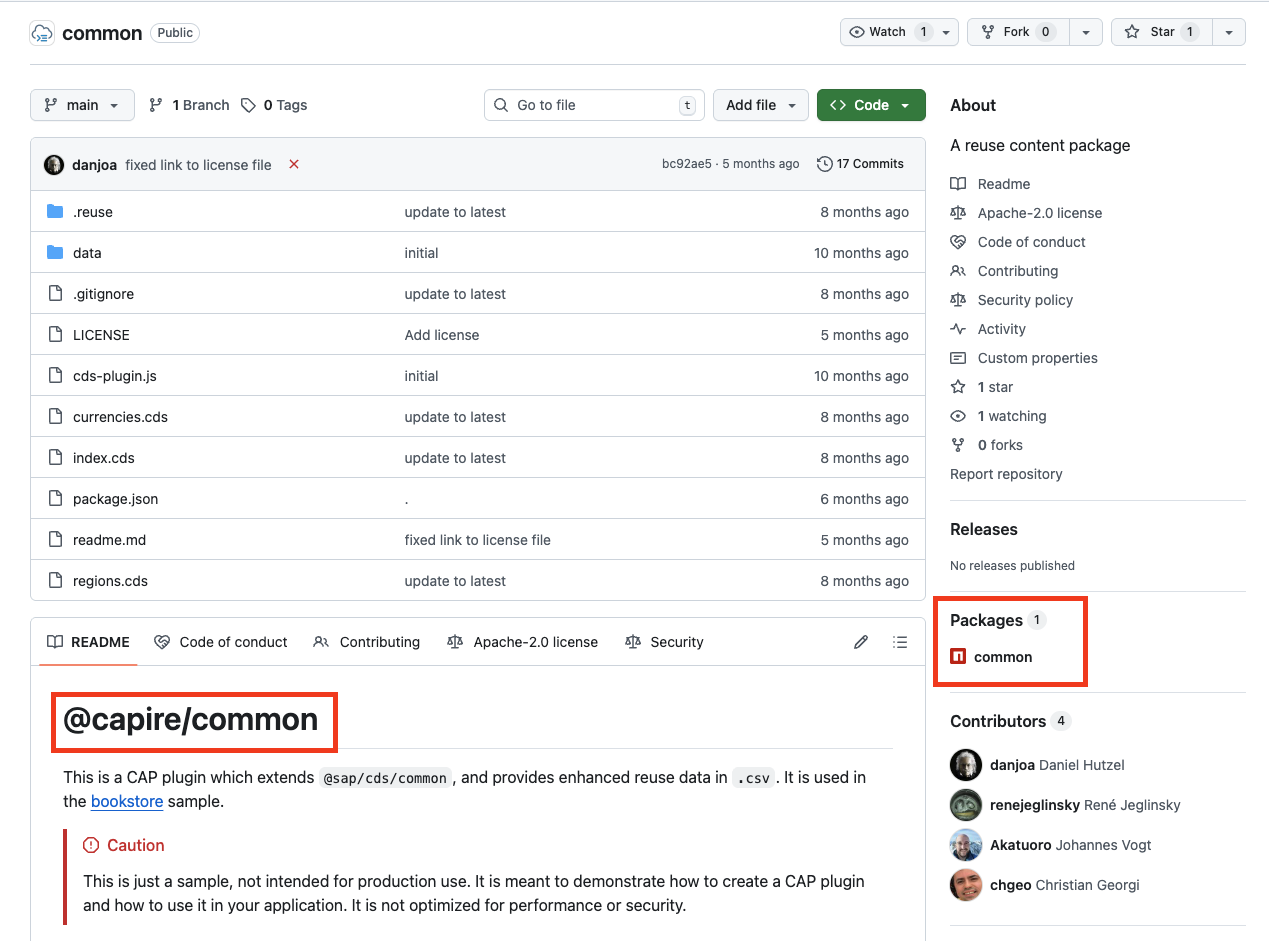
Sharing the reuse package source
First, let's share the source of @qmacro/common. Clearly the content is not
earth-shattering, but serves to illustrate the pattern as a
passive2 reuse package.
As a reminder, here's what the entire project and workspace-enclosed reuse
package looks like (minus the node_modules/ directory, to keep things brief):
.
├── package-lock.json
├── package.json
├── packages
│   └── @qmacro
│       └── common
│           ├── index.cds
│           └── package.json
└── services.cds
It's the content of packages/@qmacro/common/ that we want to share, and we
can do that in the normal way, by introducing git-based source code control,
then creating a repo on GitHub based on that git-controlled source.
While we can also add the main myproj/ project source to git-based source
code control, we won't do that now. Whenever we do it, we also want to remember
to exclude the content in packages/ as we want to share and manage the
packages source lifecycle separately.
Moving to the appropriate place
So first of all, starting from within the main project's root, i.e. myproj/,
let's move into the reuse package's directory:
cd packages/@qmacro/common/Adding a README
Every public repo on GitHub should have a README, even one as simple as this. Let's just add one now:
cat <<EOF >README.md
# @qmacro/common

See the series post
[Modules, modularity & reuse in CDS models](https://qmacro.org/blog/posts/2026/01/01/modules-modularity-and-reuse-in-cds-models/)
for the background to this simple passive CDS model reuse package example.
EOF
Setting up the repo
Now, within packages/@qmacro/common/, let's set up the git-based source code
control:
git init \
  && git add . \
  && git commit -m 'initial commit'
This emits:
Initialized empty Git repository in myproj/packages/@qmacro/common/.git/
[main (root-commit) 37f0091] initial commit
 3 files changed, 21 insertions(+)
 create mode 100644 README.md
 create mode 100644 index.cds
 create mode 100644 package.json
Pushing the repo to GitHub
Now let's share this with others by pushing it to GitHub, specifically as a new repo in my user space. I'm a happy user of the excellent GitHub CLI gh, so let's use that here3:
gh repo create common \
  --description "Simple passive CDS model reuse package example" \
  --source . \
  --public \
  --push
This emits:
✓ Created repository qmacro/common on GitHub
✓ Added remote https://github.com/qmacro/common.git
Enumerating objects: 5, done.
Counting objects: 100% (5/5), done.
Delta compression using up to 8 threads
Compressing objects: 100% (4/4), done.
Writing objects: 100% (5/5), 686 bytes | 686.00 KiB/s, done.
Total 5 (delta 0), reused 0 (delta 0), pack-reused 0
To https://github.com/qmacro/common.git
 * [new branch]      HEAD -> main
branch 'main' set up to track 'origin/main'.
✓ Pushed commits to https://github.com/qmacro/common.git
Et voila, the repo on GitHub is there.
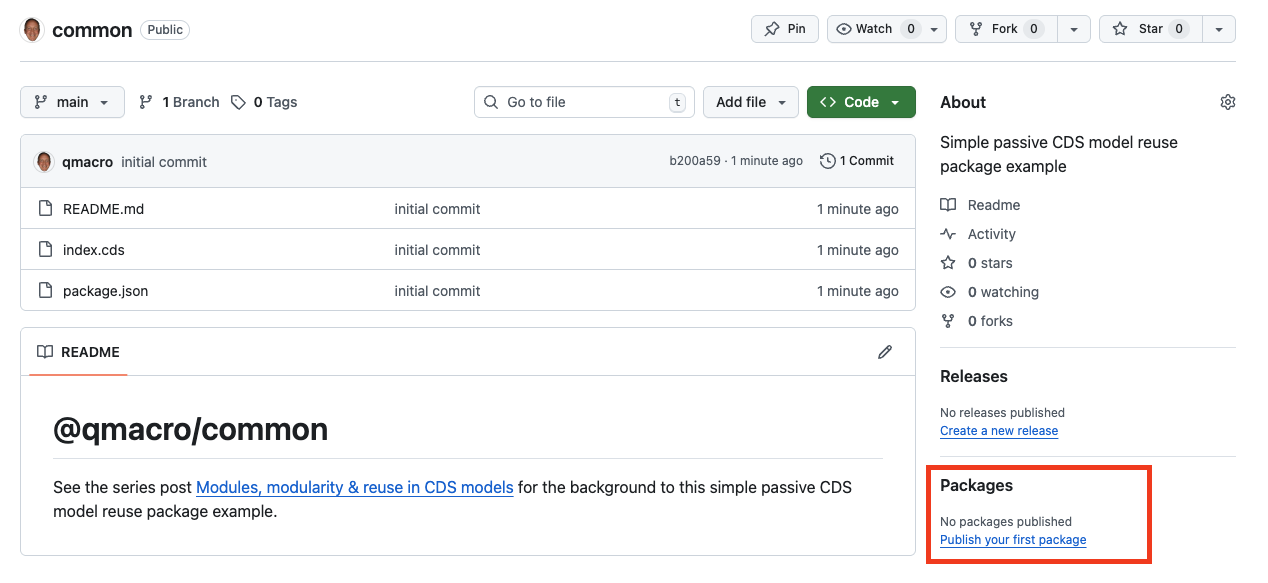
But there's no package ... yet.
Preparing to publish the package
Let's do that now. First, there's some setup required for working with the NPM registry in GitHub Packages.
Generating a token for authentication
As the GitHub documentation article Working with the npm registry states:
"You need an access token to publish, install, and delete private, internal, and public packages."
Heading over to the Tokens (classic) area of the GitHub Developer Settings, we should create a new classic token with the following scopes:
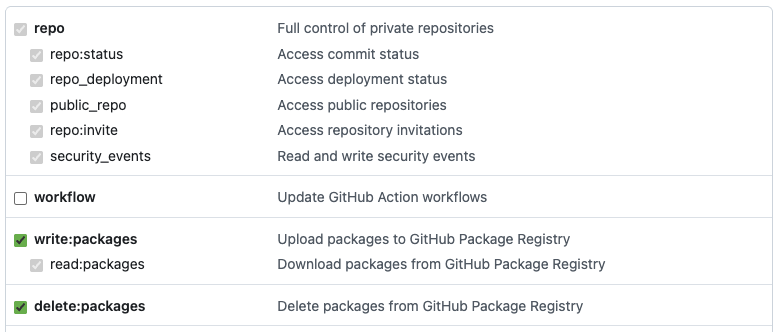
and will end up with something like this:

Associating the token with the registry
The value of the token can now be associated, in the
npmrc-based
configuration, with the NPM registry in GitHub Packages, which has the address
npm.pkg.github.com.
In an existing or new .npmrc file in your home directory, we need to add
this:
//npm.pkg.github.com/:_authToken=THE-TOKEN-JUST-GENERATEDFor more on this, see the Associate the token with the registry section of the blog post Using @capire modules from GitHub Packages.
Associating the scope with the registry
Additionally we'll need to tell the npm command line tool about how it should
use the GitHub Packages NPM registry, rather than the (default) NPM registry at
https://www.npmjs.com, for @qmacro-scoped packages.
Details about this are also covered in the aforementioned blog post in the section Namespace registry mapping required.
In that same ~/.npmrc file, we need to add this too:
@qmacro:registry=https://npm.pkg.github.comAssociate the repo with the package
While one can register packages in the NPM registry on GitHub Packages that are independent of any source repo on GitHub, it makes a lot of sense to have both and have them linked. That way, one can go from the repo source to the package, and from the package back to the repo source.
All that's needed to make this association is a repository property in the
package.json file. So let's add that, and commit & push the change to GitHub.
Here's the entire contents of the package.json file with that new
repository property4 added:
{
  "name": "@qmacro/common",
  "repository": {
    "type": "git",
    "url": "git+https://github.com/qmacro/common.git"
  },
  "version": "1.0.0",
  "main": "index.js",
  "devDependencies": {},
  "scripts": {
    "test": "echo \"Error: no test specified\" && exit 1"
  },
  "keywords": [],
  "author": "",
  "license": "ISC",
  "description": ""
}
After committing this change and pushing it to the remote on GitHub:
git add package.json \
  && git commit -m 'add repository property' \
  && git push
we're ready to actually publish the package!
Publishing the package
After all that preparation, our ~/.npmrc contents in place:
@qmacro:registry=https://npm.pkg.github.com
//npm.pkg.github.com/:_authToken=ghp_...
we're all set, and the process is simple:
npm publishThis emits output similar to the following:
npm notice
npm notice 📦  @qmacro/common@1.0.0
npm notice Tarball Contents
npm notice 243B README.md
npm notice 44B index.cds
npm notice 349B package.json
npm notice Tarball Details
npm notice name: @qmacro/common
npm notice version: 1.0.0
npm notice filename: qmacro-common-1.0.0.tgz
npm notice package size: 528 B
npm notice unpacked size: 636 B
npm notice shasum: d6b369d2e3db3878df8f9d9745b393f68a18b18b
npm notice integrity: sha512-Anr74Mjy9kRvb[...]RkUg3wgpto8UA==
npm notice total files: 3
npm notice
npm notice Publishing to https://npm.pkg.github.com with tag latest and default access
+ @qmacro/common@1.0.0
which denotes success.
Examining the results
Indeed, we can now see a package associated with the qmacro/common repo:
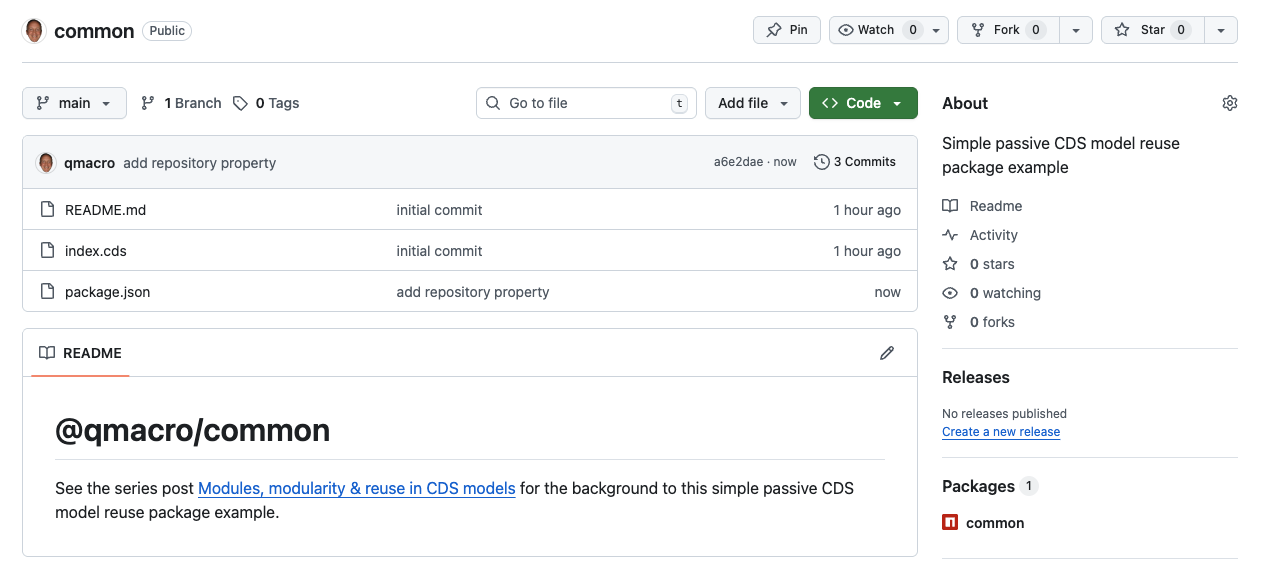
and following that package link to the package page, we see:
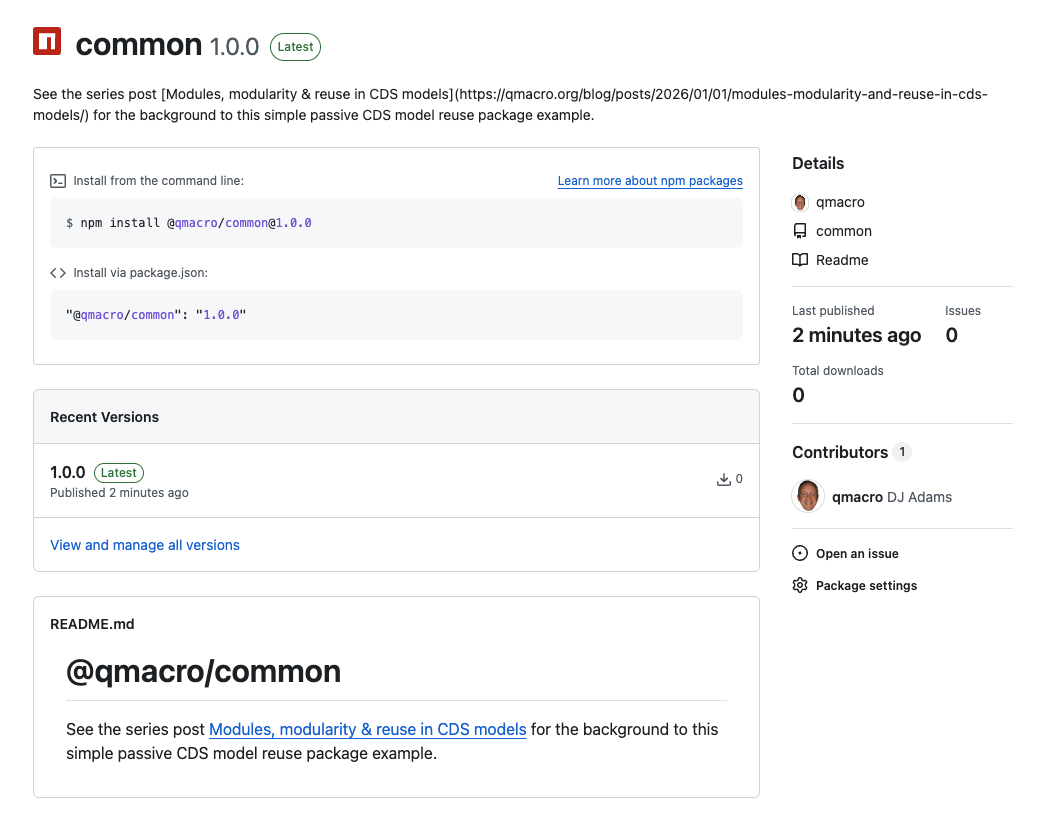
which indeed also has a link (via the README) back to the repo.
Making the package public
As described in the Publishing a package section of Working with the npm registry:
"When you first publish a package, the default visibility is private."
So in order for you to try this out, let's take one final step in this post, and change the visibility to public.
This is also simple and can be done via the package settings:
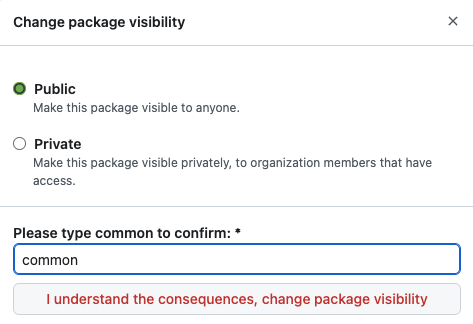
And that's it!
Wrapping up
All that's left for this post is for you to try the package out, by npm adding it to a CAP Node.js project. Let me know in the comments if it works
for you.
Now that we understand the basics of a CDS model reuse package, in the next post we'll start to take a closer look at capire/common.
Footnotes
-
There are multiple registries in GitHub Packages - for Docker, Apache Maven, RubyGems and more, as well as for Node.js packages.
-
There's that passive word again. I'll get to explaining what I mean by it at some point in this series, honest!
-
If you're not yet familiar with the command line tool options, you can invoke just
gh repo createand follow the interactive prompts instead, which start like this:? What would you like to do? [Use arrows to move, type to filter] > Create a new repository on GitHub from scratch Push an existing local repository to GitHub -
While a simpler string value like this:
{ "repository": "https://github.com/qmacro/common" }will work (similar to how it's defined for capire/common),
npm publishwill emit a warning like this:npm warn publish npm auto-corrected some errors in your package.json when publishing. Please run "npm pkg fix" to address these errors. npm warn publish errors corrected: npm warn publish "repository" was changed from a string to an object npm warn publish "repository.url" was normalized to "git+https://github.com/qmacro/common.git"