Setting up hadolint - a Dockerfile linter
Setting up hadolint as a Dockerfile linter in my development environment.
Having something to help me write better Dockerfiles is useful. Here's what I did to set up a Dockerfile linter in my development environment.
I'm writing more Dockerfiles, not least because I'm using a development container for 95% of my daily work, but also because the dockerisation of tools and environments appeals to me greatly. I came across hadolint which is a Dockerfile linter written in Haskell (hence the name, I guess).
I'm a big fan of shellcheck (see the post Improving my shell scripting) and the structured way it communicates the information, warning and error messages with codes in a standard format (SCnnnn). So I was immediately attracted to hadolint in two ways - first, that it referenced shellcheck, but mostly because it implemented and managed its own rules in a very similar way - each of them with a code in a standard format (DLnnnn) and individually documented too, just like shellcheck.
There are different points in your workflow that you can integrate such a tool - these are nicely described in a dedicated integration page. I wanted to have the linting happen in my editor, and am already using the Asynchronous Linting Engine so it was quite straightforward. Here's what I did:
Install hadolint
I installed hadolint with Homebrew on my macOS host, and by pulling down the latest binary in the Dockerfile for my development container. It's a single executable, which is quite neat. I may look into using hadolint as a Docker image instead, although I didn't at this stage because of various reasons (mostly involving a recently introduced security policy on this work laptop that automatically stops the SSH daemon, rendering the secure remote access to my Docker engine useless. But that's a story for another time).
Set up hadolint as a linter
I already use various tools for linting my content - shellcheck, yamllint and markdownlint, and have configuration set up for that, so I just added hadolint to the list, which now looks like this:
let g:ale_linters = {
      \ 'sh':         ['shellcheck', 'language_server'],
      \ 'yaml':       ['yamllint'],
      \ 'markdown':   ['markdownlint'],
      \ 'dockerfile': ['hadolint'],
      \ }
Because I sometimes create Dockerfiles with different names, I also added a new section to my Vim configuration telling it that these files are also to be treated as Dockerfiles:
augroup filetypes
  au!
  autocmd BufNewFile,BufRead Dockerfile* set filetype=dockerfile
augroup END
Now I get lovely warnings and errors in the left hand column so that I can improve:
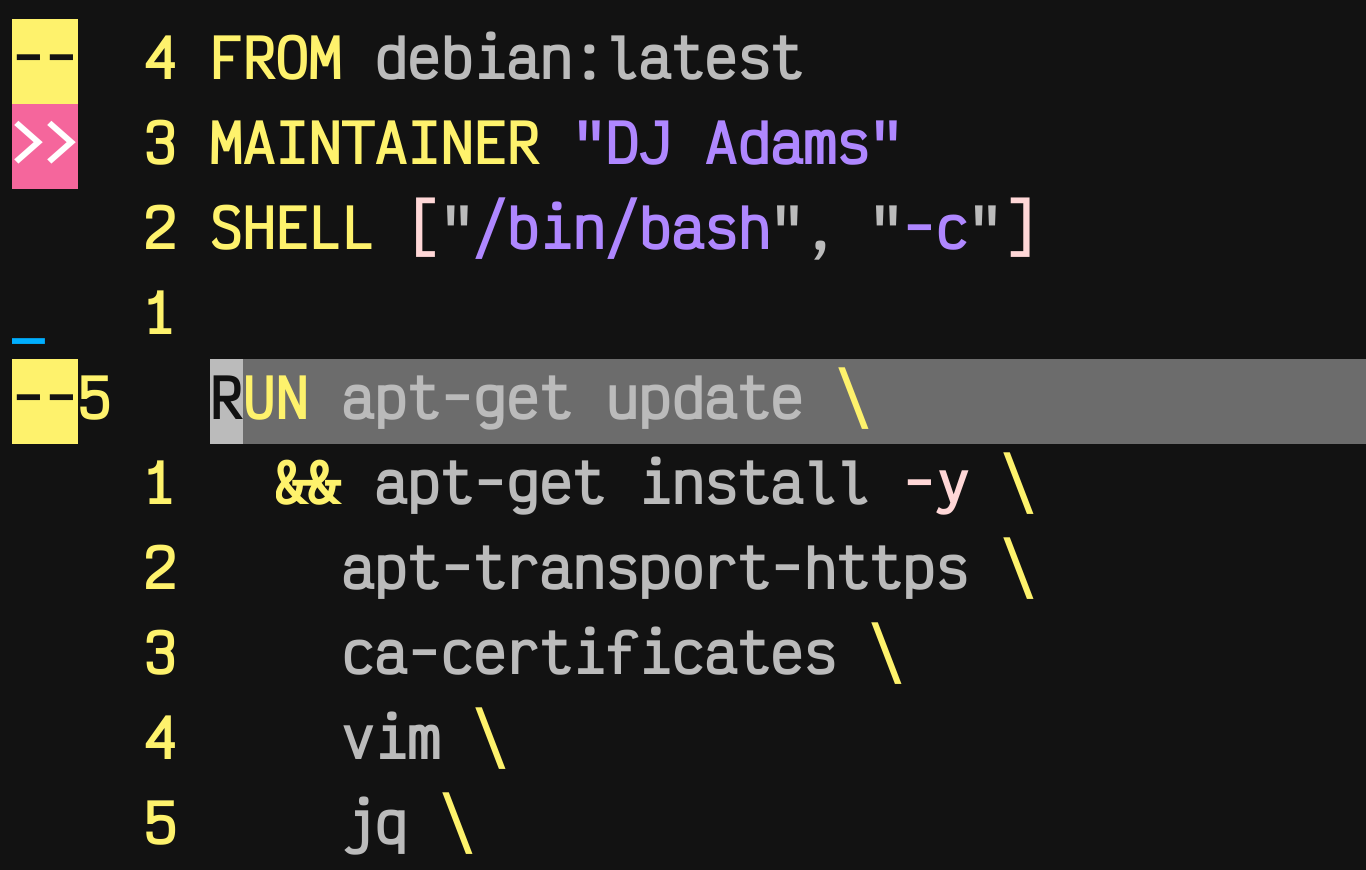
In case you're wondering, the message details are shown at the bottom of my editor when I select the lines, and they are (in order):
- DL3007 Using latest is prone to errors if the image will ever update. Pin the version explicitly to a release tag.
- DL4000 MAINTAINER is deprecated.
- DL4006 Set the SHELL option -o pipefail before RUN with a pipe in
All very helpful - thanks hadolint!